Prompts
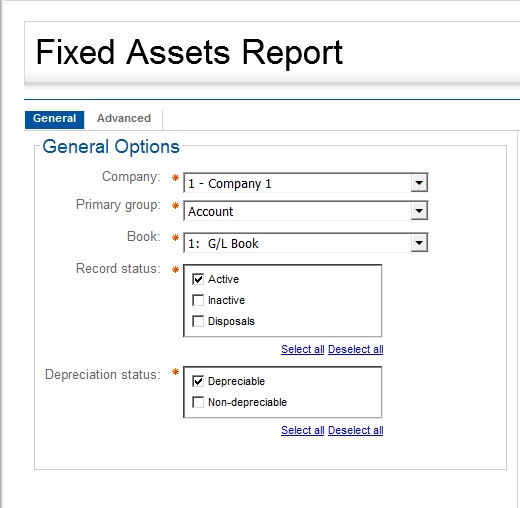
The prompts for the Fixed Asset Report includes the Company ID, Book, Depreciable Status Code, Group, and Status Code.
|
Prompt Message |
Description |
|---|---|
|
Company |
Select the ID of the company that you want to be included in the report. |
|
Primary group |
Select the group to be included in the report. |
|
Book |
Enter the book that you want to get data from. |
|
Record status |
Select the status code of the fixed assets that you want to be in the report. |
|
Depreciation status |
Select the Depreciable Status code which can either be Depreciable or Non-depreciable. |
|
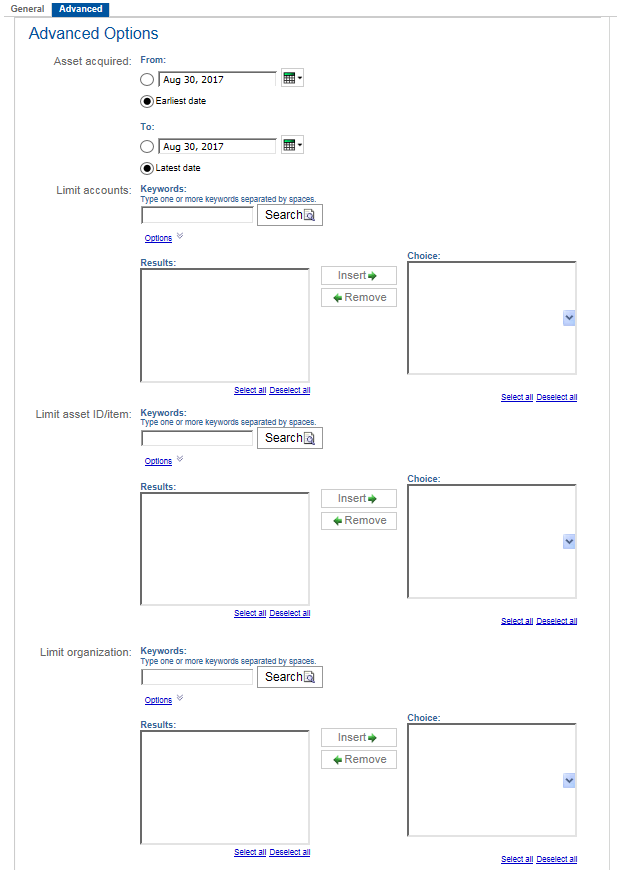
Asset acquired from and to |
Specify the date range of the fixed asset. The depreciation computation will be based on the dates entered. |
|
Limit accounts |
Enter a portion of one or more accounts in the Keywords field to be included in the report. |
|
Limit asset ID/item |
Enter a portion of one or more asset IDs/items in the Keywords field to be included in the report. |
|
Limit organization |
Enter a portion of one or more organizations in the Keywords field to be included in the report. |