Report with the Open Plan Web Publisher
The Open Plan Web Publisher enables you to publish any Open Plan view or report as a document that can be viewed by most common Web browsers.
By producing reports using the industry-standard HTML and Adobe Acrobat PDF formats, you can provide electronic versions of the most up-to-date project information to any project member.
For example, assume that one of your responsibilities as a project manager is to gather information each month about the current status of one or more projects, update a set of standardized reports to reflect the revised schedule, and make these reports available to the appropriate managers in your organization.
In addition to producing reports for the Web, you can also use the Open Plan Web Publisher to define and run report batches that can be produced on any output device defined for your Windows system.
To produce reports for publication on the Web, you must have the Adobe Acrobat PDFWriter installed as an output device for your Windows system. This utility is included in software packages such as Adobe Acrobat Exchange or Adobe Acrobat Distiller.
- To view a report produced in the PDF format, you must have an installed copy of Adobe Acrobat Reader. This utility is automatically installed on your system by the Open Plan installation and is also available free of charge from Adobe.
- To view a report produced in the PDF format on the Web, your Web browser must support the use of Acrobat Reader as a helper application.
HTML Document
In addition to the reports in the batch, Open Plan produces an HTML document that lists each report in the batch.
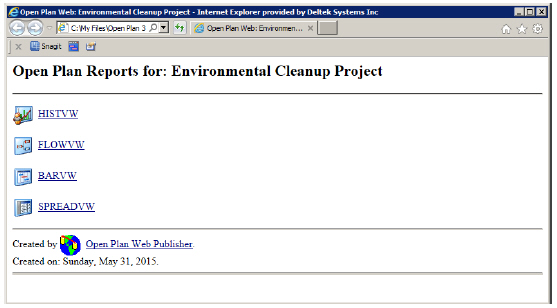
Each icon in the HTML document serves as a Uniform Resource Locator (URL) link to a PDF file generated from a view. This HTML document can then be placed on any Web server, making the views available to all users with access to that server. To display a view listed in the HTML file, click the appropriate icon.
Starting Open Plan Web Publisher
You can start the Open Plan Web Publisher either by clicking Web Publisher on the Tools tab or by clicking the Open Plan Web Publisher icon in the Deltek Applications group in Windows. The initial dialog box that is displayed depends on whether an Open Plan project has focus when you start the Open Plan Web Publisher.
If no Open Plan project has focus, the Select Project dialog box is displayed.
If an Open Plan project has focus, the Open Plan Web Publisher dialog box is displayed. This dialog box displays the Open Plan Web Publisher dialog box, which displays a list of the views currently included in a report batch. You can also use the dialog box to update, delete, preview, and run existing batches.
Defining Output Options
In addition to defining the views contained in a report batch, you can use the Open Plan Web Publisher dialog box to control the publication of the batch using the following dialog box settings:
- Current Device
- Destination Directory
- Generate HTML File
- Web Site Address