The Open Plan Window, Tabs, Menus, and Commands
The Open Plan window offers an overview of the various menu options, commands, tabs, icons, and menu groups available in Open Plan.
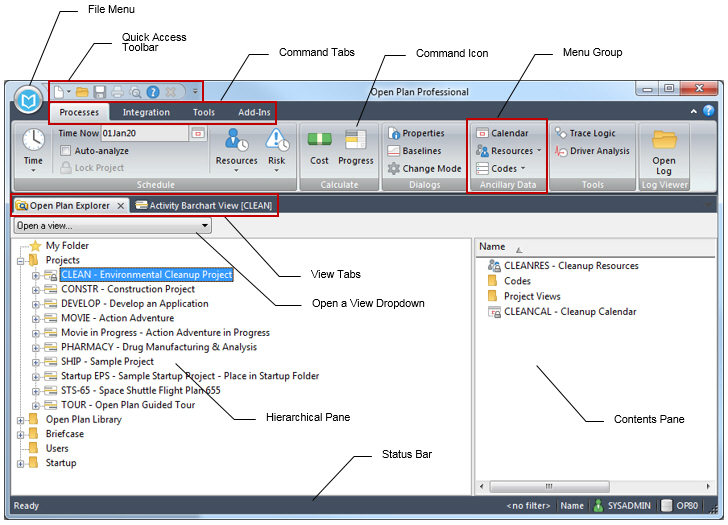
- Related Topics:
- Contents of the Open Plan Window
Use the fields and options to configure the Open Plan window. - Status Bar
The Status bar is located at the bottom of the Open Plan window. Some information is only visible in a certain context. - Quick Access Toolbar
You can easily access and perform several basic commands using the Quick Access toolbar. - File Menu
This section explains the File menu and how its various options function. - Processes Tab
Use this tab contains to run processes in Open Plan. - Integration Tab
Use this tab to import data to or export data from wInsight Analytics. - Tools Tab
This section discusses the options and tasks on the Tools tab. - Add-Ins Tab
- Edit Tab
- View Tab
- Related Procedures
- Tabs and Dialog Boxes
- Find
This command enables you to find an object in any subfolder of the folder that is currently selected in the Open Plan Explorer. - Find Next
This command enables you to find the next activity that meets the search requirements that you have previously issued in a Find And Replace command. - Spreadsheet: Insert Rows
This command displays the Insert Rows dialog box, which enables you insert one or more rows above the selected row.
Parent Topic: Explore Open Plan