Contents of a BOD Product Paragraph
Use the contents of this paragraph to select a product listing to use as a basis of design for a product type.
Contents (New Workspace)
The contents of a BOD Product paragraph are similar to those of a regular paragraph, but include special capabilities that support intelligent product selection.
Control Options
For
administrators and
authors, multiple control options are available for working with a BOD Product paragraph. Control options for this paragraph, such as
 Add Content and
 Activate Content are the same as those in regular paragraphs.
For more information, see Contents of a Paragraph (New Workspace).
Contents
For a BOD Product paragraph, the following content is available:
| Item | Description |
|---|---|
| Property Key or Title | This paragraph's property key is
Basis-of-Design Product, which is unique to BOD Product paragraphs.
|
| Paragraph Content or Value | This text adds context to the specified listings in the paragraph. For a BOD Product paragraph, the following content is available:
|
| BOD Product | In this text field, specify a product listing that the
product type uses as a basis of design. To specify the BOD product:
This text field has a default value of [Insert manufacturer's name; product name or designation]. |
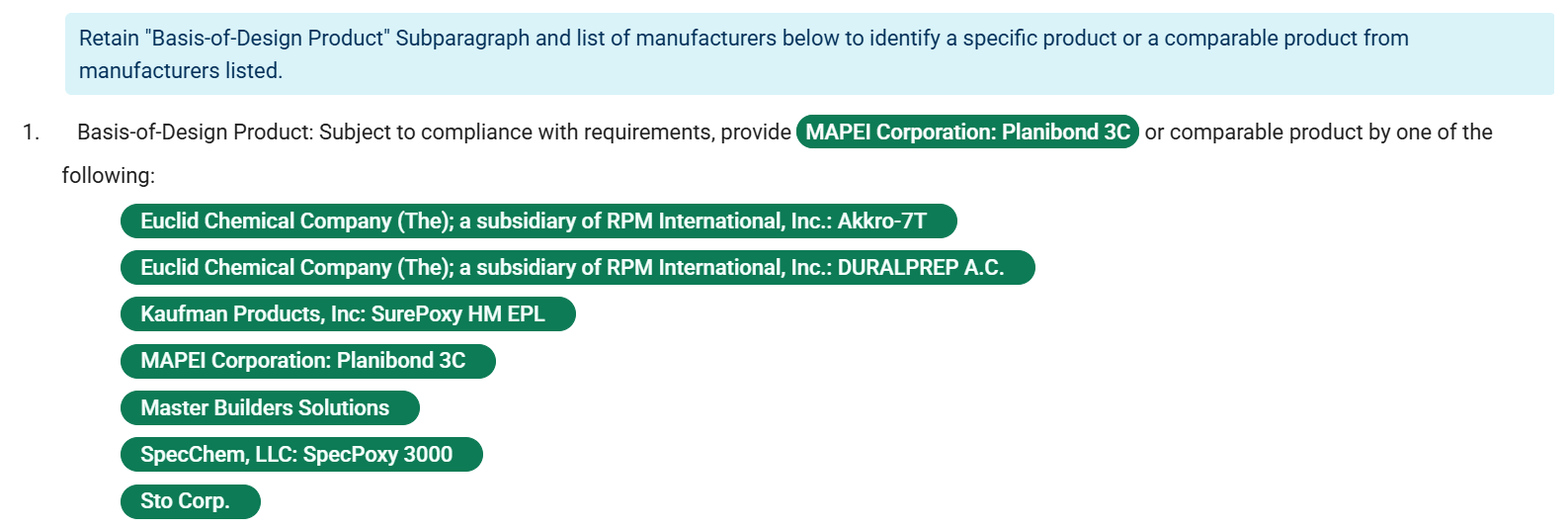
| Comparable Products | This displays a list of manufacturers and product listings that were added to your project for the BOD Product paragraph's corresponding product type as comparable products. The listings are displayed as selected pills. This list appears only when the paragraph is active.
To add a product registered in Specpoint as a comparable product, open the Product Listings window and add the product listing. This automatically adds the listing in its own pill. |
Contents (Classic Workspace)
The contents of a BOD Product paragraph are similar to those of a regular paragraph, but include special capabilities that support intelligent product selection.

Control Options
For
administrators and
authors, multiple control options are available for working with a BOD Product paragraph. Control options for this paragraph, such as
 Manage Options and
 Activate Content, are the same as those in regular paragraphs.
For more information, see Contents of a Paragraph (Classic Workspace).
Contents
For a BOD Product paragraph, the following content is available:
| Item | Description |
|---|---|
| Property Key or Title | This paragraph's property key is
Basis-of-Design Product, which is unique to BOD Product paragraphs.
|
| Paragraph Content or Value | This text adds context to the specified listings in the paragraph. For a BOD Product paragraph, the following content is available:
|
| BOD Product | In this text field, specify a product listing that the
product type uses as a basis of design. To specify the BOD product:
This text field has a default value of [Insert manufacturer's name; product name or designation]. |
| Comparable Products | This lists the following manufacturers and product types in their respective pills:
In the given example, the following is the option set for comparable products: On this option set, you can perform the following actions:
For more information, see Design Automation for Element Contents and Design Automation for Product Selection. To add a product registered in Specpoint as a comparable product, open the Product Listings window and add the product listing. This automatically adds each listing as its own pill. |