Options Tab
Use the Options tab to specify how a code window displays information.
Contents
Use the fields and options to configure the Code Display Preferences dialog box.
| Field | Description |
|---|---|
| Box Color |
You can define the color that Open Plan should use for the code box lines as well as for any text that is displayed within the box by selecting from the following options:
You can define custom colors using an enhanced version of the Color dialog box accessed from the Color tab of the Options dialog box. If a color has already been defined for the box color but is not currently used, you can also select that color from the list. |
| Box Style |
You can select a style for the code boxes from a list. Notice that one of the styles has a triangle at the lower-right corner. This triangle is displayed in the selected box color. If you add a note to a code, the code box for that code displays a second triangle that is always black. |
| Box Contents |
You can display the entire code ID or just the local portion of each ID. |
| Box Size |
The following options control the size of the code boxes:
|
| Layout |
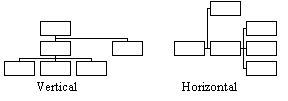
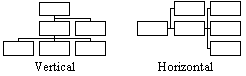
You can choose between the following two layout options:
|
| Compression |
You can choose whether or not to enable compression.
|
| General |
Depending on your layout choice, enabling one, none, or both of the general options gives you the following code hierarchy orientations:
Selecting both of the options displays the hierarchy using a combination of the rules. The display is centered in relation to the display window.) |