How a Code Window Displays Information
A code view is graphic representation of the hierarchy of project codes.
Open Plan permits two types of coding systems that distinguish between different hierarchical levels:
- Punctuated Significant
- Fixed Format Significant
Open Plan displays codes in a structural display in one of two orientations:
| Orientation | Description |
|---|---|
| Vertical | The top parent codes are displayed at the top of the structure, with the child codes arranged beneath them.
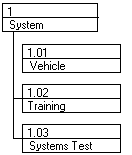
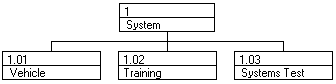
You can display codes in a vertical orientation as a ladder:
And, you can display codes in a vertical orientation as a spread:
|
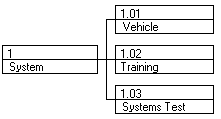
| Sideways | The top parent codes are displayed at the left of a code structure, with the child codes arranged to the right of them.
You can display codes in a sideways orientation as a ladder:
And, you can display codes in a sideways orientation as a spread:
|

For each of these orientations, Open Plan can also display the codes in one of two manners:
| Orientation | Description |
|---|---|
| Centered | The parent code is centered relative to its children.
In a vertical orientation, the parent code is centered above its children:
In a sideways orientation, the parent code is centered to the left of its children:
|
| Offset | The parent code is offset relative to its children.
In a vertical orientation, the parent code is displayed above its topmost child:
In a sideways orientation, the parent code is displayed to the left of its leftmost child:
|
You can customize the information detail that is displayed in code boxes in many ways:
- You can choose to show the full ID of the code.
- You can choose both a style and a color for the code box.
You can also customize the layout of information that is displayed within the code box.
Open Plan makes it easy to work with code hierarchies. For example, you can assign an entire group of codes to a different parent code by dragging the code boxes to a different position in the code hierarchy. You can also expand and collapse individual parent codes in order to display the appropriate level of detail. When you collapse a parent code, it is displayed as a stacked series of code boxes.
In addition, you can display the code hierarchy in a compressed mode in which individual codes belonging to one parent code can be displayed beneath another parent code.