The Project Lifecycle
Each company has their own way of organizing and managing projects.
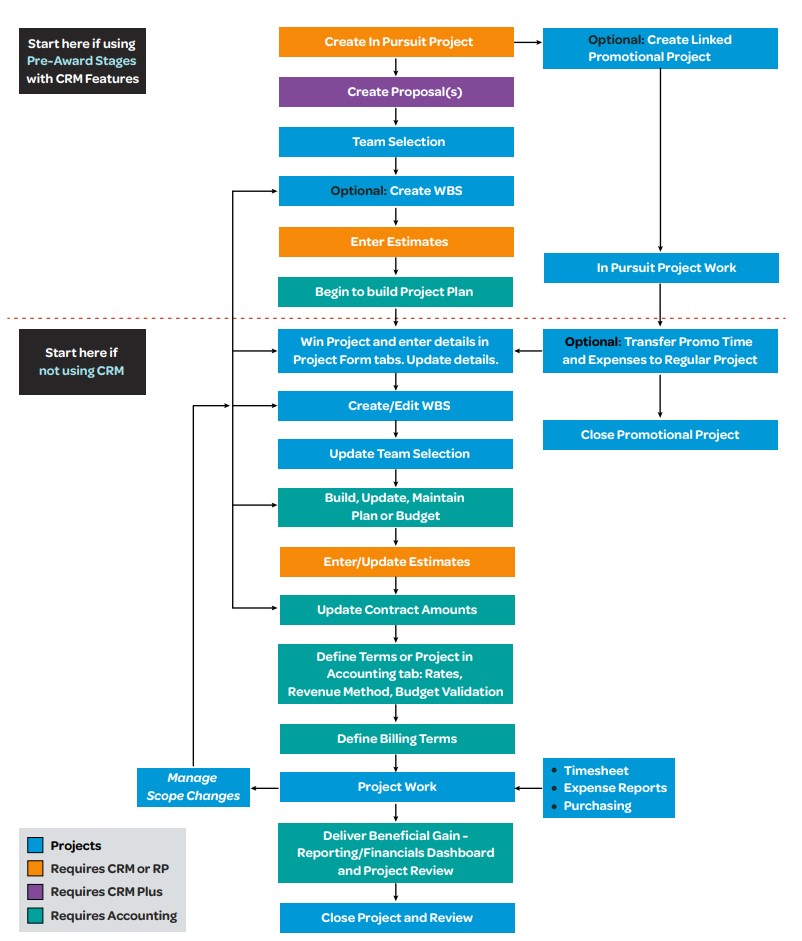
No single flowchart can represent the many ways that different companies might follow a project process. Below is a sample project lifecycle flowchart - not everyone will use every step or do things in the same order, but even companies following different processes will touch the same distinct milestones at some point.
For details on these processes, review the related subtopics describing each step. For information about how to use the Vantagepoint user interface to accomplish these steps, see Projects Hub
- Related Topics:
- Create a Project
The first step in the project lifecycle process is to create your project. - Create a Proposal
If you have CRM Plus, you can create proposals to sell your firm's services and win new business. Proposals contain all the information about your firm, your employees, and your previous work that prospective clients want to know before they award a contract. - Select Teams
While pursuing a project, you can use the Team tab of the Projects form to create a list of firms, employees, and external contacts that are associated with the project. - Create a Work Breakdown Structure
A work breakdown structure (WBS) organizes each of your projects into distinct, manageable work elements. - Enter Estimates
If you own CRM, CRM plus, or Resource Planning, you can use the Estimates feature to enter estimate information for labor, expenses, consultants, and units for an in-pursuit or a newly won project. That information is then used to forecast your potential revenue stream on the Project Forecast report. - Enter Project Details
Once you have won a project, you can enter more details using the tabs on the Projects form. - Create a Project Plan and Budget
Planning and budgeting are important elements in a project's success. - Update Contract Amounts
In , you can enter and manage both the negotiated contract amounts for a project and the compensation amounts that you expect to receive for executing that project. - Provide Accounting Details
If you have the Accounting module, you can enter accounting information for your project. - Define Billing Terms
If you'll be using Vantagepoint to create invoices for projects, you can define the project billing terms in . - Record Project Charges
The next phase of a project is recording the charges being applied against it. - Monitor Ongoing Project Work
At this project phase, you can review how well your project is doing. - Close the Project
The final step in the lifecycle of a project is project closure.
Parent Topic: Project Management