Entering intercompany vendor invoices and client receipts
unavailable in ajeraCore
As part of the monthly reconciliation process, review the Multi-company Reconciliation report and reconcile your intercompany accounts.
An intercompany bank transfer is the recommended method for reconciling these accounts because it makes both sides of the entry for you.
However, if you must pay another company in your organization with a check, you can use an intercompany vendor invoice and an intercompany client receipt to relieve the intercompany accounts.
With this method, both the intercompany vendor invoice and the intercompany client receipt are required to complete the audit trail. Until both are completed, the intercompany accounts are out of balance.
|
Note: |
The following steps describe the underlying processes of intercompany vendor invoices and client receipts. They link to the Entering vendor invoices, Paying vendor invoices , and Entering a client receipt, which provide specific details on how to perform these tasks. |
To enter intercompany vendor invoices and client receipts
- To record that Company 1 owes Company 2 payment, enter a vendor invoice and select Company 2 as the vendor and Company 1 as the company. Be sure to:
- Select the Intercompany invoice check box.
- Enter the cost amount in the table.
- Press the Tab key.
- Ajera does this:
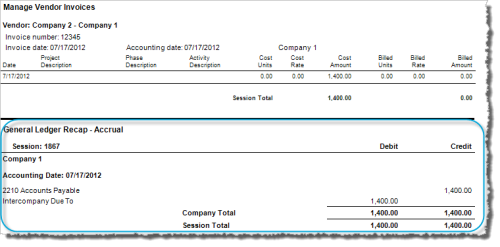
- Accrual accounting: Debits the Intercompany Due To account for Company 1 and credits Accounts Payable
- Cash accounting: N/A
- Click Save.
- Pay the vendor invoice or enter a vendor payment to Company 2 immediately.
- Ajera does this:
- Accrual accounting: Debits Accounts Payable and credits Cash
- Cash accounting: Debits the Intercompany Other Income account for Company 1 and credits Cash
The intercompany accounts are out of balance.
- To record that Company 2 received payment from Company 1, enter the client receipt, select Intercompany from the Type field, and enter Company 1 as the client and Company 2 as the receipt company.
- Ajera does this:
- Accrual accounting: Debits Pending Deposit or Cash and credits the Intercompany Due From account for Company 2
- Cash accounting: Debits Pending Deposit or Cash and credits the Intercompany Other Income account for Company 2
The intercompany accounts are now in balance.
Example:
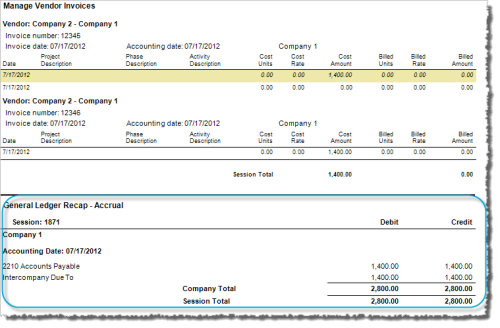
Company 2 is set up as a vendor and sends a vendor invoice to Company 1 for $1,400.
- In the
 >
> - Select the Intercompany invoice check box.
- Enter 1400 in the Cost Amount field, and press the Tab key.
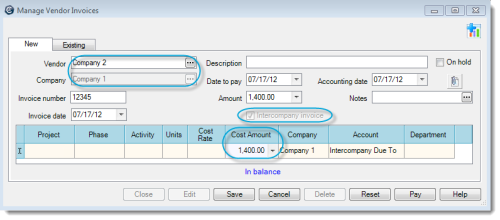
- Click Save.
Here is how it looks on the session journal:
Company 1 pays the vendor invoice from Company 2.
- From the >
- If needed, expand the invoice and select the Pay check box.
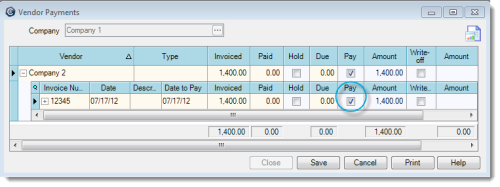
- Click Save.
Here is how it looks in the session journal:
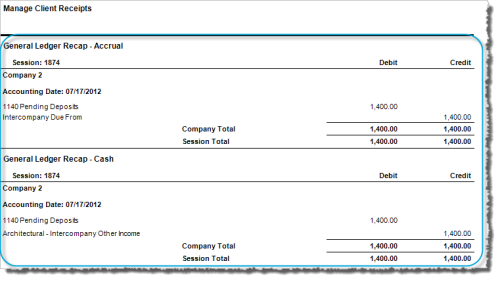
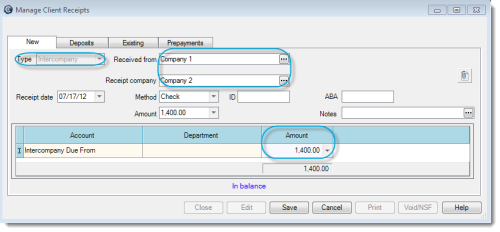
Company 2 enters a client receipt, recording the payment from Company 1.
- In the >
- Select Company 1 from the Received From field and Company 2 from the Receipt Company field.
- Enter 1400 in the Amount field, and press the Tab key.
- Click Save.
Here is what it looks like in the session journal: