The Open Plan Window, Tabs, Menus, and Commands
The Open Plan window offers an overview of the various menu options, commands, tabs, icons, and menu groups available in Open Plan.
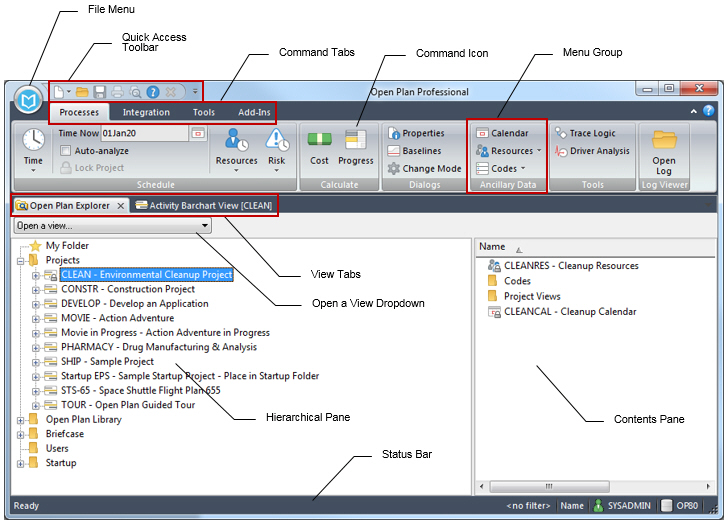
Contents of the Open Plan Window
Use the fields and options to configure the Open Plan window.
Status Bar
The Status bar is located at the bottom of the Open Plan window. Some information is only visible in a certain context.
Quick Access Toolbar
You can easily access and perform several basic commands using the Quick Access toolbar.
File Menu
This section explains the File menu and how its various options function.
Processes Tab
Use this tab contains to run processes in Open Plan.
Integration Tab
Use this tab to import data to or export data from wInsight Analytics.
Tools Tab
This section discusses the options and tasks on the Tools tab.
Add-Ins Tab
Edit Tab
View Tab
Related Procedures
Tabs and Dialog Boxes
Find
This command enables you to find an object in any subfolder of the folder that is currently selected in the Open Plan Explorer.
Find Next
This command enables you to find the next activity that meets the search requirements that you have previously issued in a Find And Replace command.
Spreadsheet: Insert Rows
This command displays the Insert Rows dialog box, which enables you insert one or more rows above the selected row.
Parent Topic:
Explore Open Plan
