The Asset Card
Select an asset and click Show asset card (or the card toolbar icon) to open the detail view.
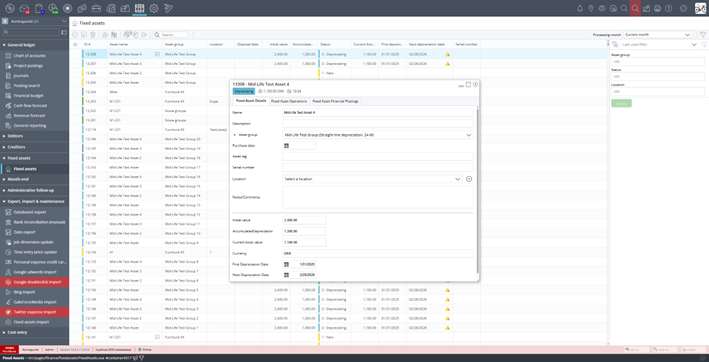
Asset card showing Fixed Asset Details tab
The card has three tabs:
Fixed Asset Details
The Fixed Asset Details tab includes the following editable fields:
| Field | Type | Notes |
|---|---|---|
| Name | Text (max 255) | Required |
| Description | Text (max 1000) | Optional |
| Asset group | Dropdown | Read-only after capitalization |
| Purchase date | Date | Cannot be after earliest operation date |
| Asset tag | Text (max 255) | Must be unique within the company |
| Serial number | Text | Optional |
| Location | Dropdown | Optional, can add new locations |
| Notes/Comments | Text | Optional |
| Field | Description |
|---|---|
| Initial value | Set during capitalization |
| Accumulated Depreciation | Updated by depreciation operations |
| Current book value | Calculated: Initial value − Accumulated depreciation ± Revaluations |
| Currency | Company currency |
| First Depreciation Date | Set during capitalization |
| Next Depreciation Date | Advanced by each depreciation run |
Fixed Asset Operations
The Fixed Asset Operations tab shows the complete history of operations performed on the asset.
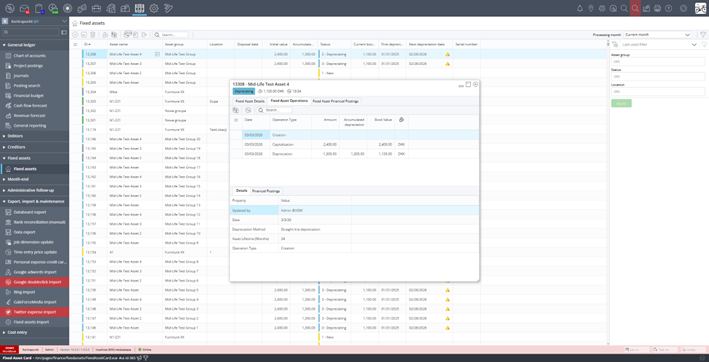
Asset card showing Fixed Asset Operations tab with creation, capitalization, and depreciation history
The operations grid displays the following columns:
| Column | Description |
|---|---|
| Date | When the operation was performed |
| Operation Type | Creation, Capitalization, Depreciation, Revaluation, Disposal, Undo Capitalization |
| Amount | The monetary impact of the operation |
| Accumulated depreciation | Running total of depreciation after this operation |
| Book Value | Asset book value after this operation |
Selecting an operation shows its Details (who performed it, depreciation method, lifetime) and Financial Postings (the journal entries created).
Fixed Asset Financial Postings
The Fixed Asset Financial Postings tab shows all journal entries posted for the asset across all operations. Use this tab to review the posting history for the asset.