Email Advisor (Tools Tab)
The Email Advisor sends automatically generated email messages from within Open Plan.
While an email advisory can contain any information and can be sent to any person with a valid email address, it is typically used to convey information to team members and to facilitate communication between departments and project managers.
When a project is open, you can access the Email Advisor by clicking Email Advisor on the Tools tab. Doing so displays the Advisory Definitions dialog box. The Advisory Definitions dialog box displays a list of previously defined advisory definitions that you can test and send. An advisory definition is the name assigned to a set of values that collect project information that can then be sent to recipients in an email.
Using the Email Advisor, you can specify the following conditions:
- Recipients: You can specify either a single email address or a list of addresses to which the advisory will be sent.
- Subject: In addition to being able to enter both text and any field from the activity table in the subject line of the advisory, you can also enter a calculated field based on the activity table.
- Message: As in the case of the subject line, the message can include both text and any field from the activity table as well as calculated fields based on the activity table.
- Filter: You can select a pre-defined filter to specify the activities that can generate an email advisory.
You also have the option of combining all the messages generated by the advisory into a single email that is sent to each addressee.
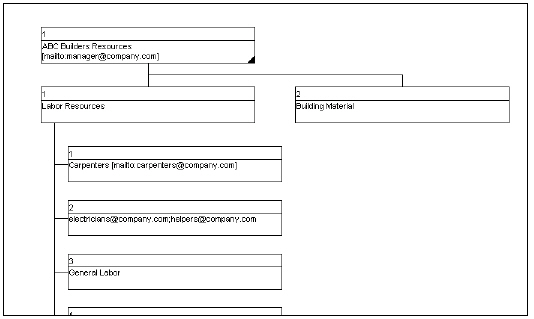
The following shows email addresses added to the description field of a code file: