Using Spread Curves to Define Resource Assignments
Spread curves allow you to define the manner in which a resource assignment is distributed over the duration of an activity.
When assigning a resource to an activity, you can use the Red Curve field on the Resources tab of the Activity Details dialog box to select a predefined spread curve.
As shipped from Deltek, Open Plan provides the following standard spread curves.
| Spread Curve | Description |
|---|---|
| B - Back Load | 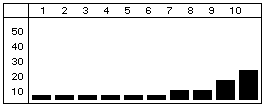
Most of the resource effort is allocated toward the end of the duration. |
| D - Double Peak | 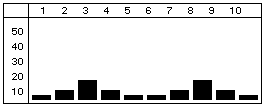
Most of the resource effort is allocated to two peaks - one near the beginning of the duration and one near the end. |
| E - Early Peak | 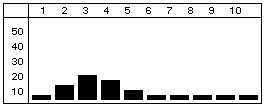
Most of the resource effort is allocated near the beginning of the duration. |
| F - Front Load | 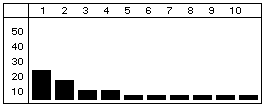
Most of the resource effort is allocated at the beginning of the duration. |
| L - Late Peak | 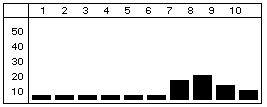
Most of the resource effort is allocated near the end of the duration. |
| N - Normal (Bell) | 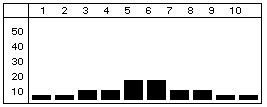
The resource effort starts with a minimal effort, gradually increases to the middle of the duration, and then tapers off. |
| T - Linear | 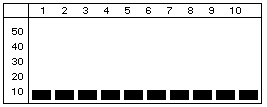 The requirement is interpreted as a total quantity allocated as evenly as possible throughout the duration The requirement is interpreted as a total quantity allocated as evenly as possible throughout the duration
|
Through the use of the Spread Curves dialog box, you can customize this list by adding new spread curves and modifying or deleting those that have already been defined. Clicking New on the Spread Curves dialog box displays the New Spread Curve dialog box.
When you select an existing spread curve from the Spread Curves dialog box and click Edit, Open Plan displays the Edit Spread Curve dialog box. This dialog box is similar to the New Spread Curve dialog box except that the Name field is disabled. You can edit only the description and percentage values in the Cumulative and Incremental rows. Select the Access Control option to grant rights to other users in the data source to use the curve.
Be aware that modifying or deleting a spread curve that is in use by another project will affect the project the next time resource scheduling is performed or a baseline is updated.