Data Types
Data in People Planner can be of different types, and the source with the external data must consider this.
This is the start of your concept.
This is especially the case when the external data is stored as a CSV file. The content of a CSV file is pure text, and the Import Mapping must know how to translate the text into the relevant data type.
Example
If the target data type is a date, and the text is "02-09-2016," the import must know if this was stored in "dd-mm-yyyy" or "mm-dd-yyyy" format.
The data types are:
- Text
- Numbers
- Checkboxes/flags
- Dates
- LookUps
Text
Many fields in People Planner are of the text type. Some examples are the name of a resource or a project. You can normally import text fields directly without any issues.
An exception to this is if the external file is a CSV file. In a CSV file the individual columns are divided by a dedicated delimiter character such as a semicolon (;) or a comma (,). If the delimiter happens to be included in the text field, the usual solution is to place the text inside quotation marks, as the following example shows.
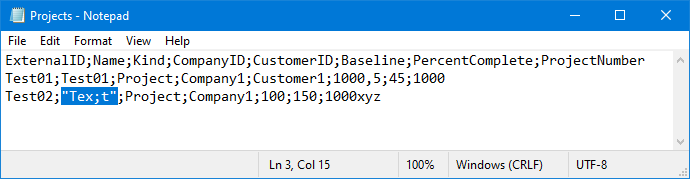
Some fields may appear to be a number, but are actually a text field. An example of this is the Project Number. People Planner does not care if the data has been stored as text or number format-for example in Excel-and imports the field just fine.
If the external source is a CSV file, encoding can be an issue. See Import from a CSV File for more details.
Number
Number fields in People Planner can be of two types: Integer fields and Decimal Number fields.
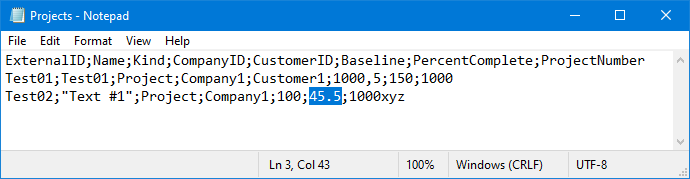
A Decimal Number field can then show numbers like 45.5, whereas an Integer field cannot show any decimals.
In the following example, the Baseline field is a Decimal Number field, while the PercentComplete field is an Integer field (and the ProjectNumber field is a text field).
-
Excel: The import rounds the number off to the nearest integer. In this case, the value "46" is imported.
- CSV: The import fails with an error message that the input is not in a correct format.The import fails with an error message that the input is not in a correct format.
- The Nordic countries: 10.000,50
- US: 10,000.50
You can configure which separators you should use in your Windows settings. You should generally avoid the thousands-separator altogether and only have to worry about using the correct decimal symbol.
Checkbox or Flag
Some of the columns in People Planner are checkbox columns, sometimes also called flags.
If the source is a CSV file, you use the value "True" to select the checkbox and "False" to deselect it.
When the source is an Excel file, you can still use "TRUE" and "FALSE" for this. However, you can also use the fact that a checkbox is just a special case of an Integer field where 0 means False and any value different from 0 means True.
Date
If you import from a CSV file, and it contains dates, you must consider how the dates are written:
- Nordic countries - 02-09-2024
- US - 09-02-2024
If you have the format wrong, and you attempt to import some data, one of two things can happen:
- In the best case, you get an error message.
- In the worst case, the dates are imported into People Planner, but they are wrong; for example, the day and month parts are switched around.
You can configure which date format you should use in your Windows settings.
LookUp
These columns point at data that has been imported into a different table in the People Planner database.
If you import a row of data where one of the fields refers to some other piece of data that you also import, you must ensure that that data has already been imported into the other table before you refer it to its ExternalID from a different Import mapping.