Set Up the Colorado FAMLI on the Manage Deductions Screen in 2023
Configure the Colorado Paid Family and Medical Leave Insurance (FAMLI) on the Manage Deductions screen.
To set up the Colorado FAMLI deduction:
-
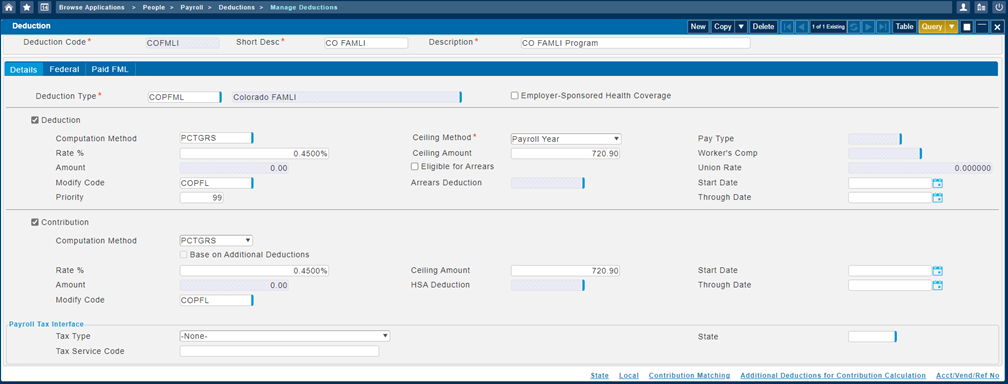
In the Deduction section on the Details tab, enter the following, and then set other deduction values as needed:
- Computation Method: PCTGRS
-
Rate%: 0.45%
You may choose to cover any amount of the employee's portion of the premium. The most an employer can deduct from an employee is 0.45% of their wages, but the employer can choose to only deduct 0.1% or 0.2% or deduct nothing at all.
- Ceiling Method: Payroll Year
-
Ceiling Amount: 720.90
Colorado regulations state the amount of wages subject to a premium assessment is capped at the maximum wages subject to social security tax. In 2023, the social security wage limit is 160,200.00. The Ceiling Amount must be manually calculated and entered each year, based on the following formula: SS Wage Limit x Deduction Rate %. In 2023, this is 160,200.00 x 0.45%, which results in a Ceiling Amount of 720.90.
- If you need to exclude certain pay types from FAMLI wages, then you must enter
Modify Code to either add or subtract pay types.
On the Manage Deduction Modify Codes screen, you can set up any pay types that should not be used to calculate the Colorado FAMLI deduction amount.
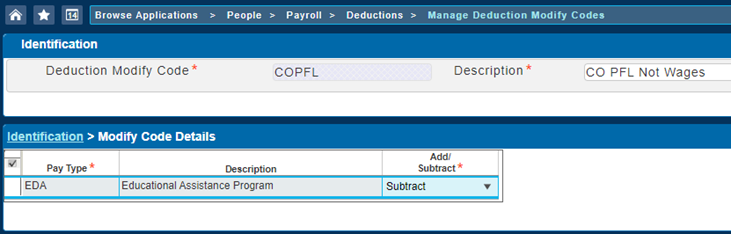 Note: You must add the same modify code in the Contribution section.
-
Assign the
Deduction Code to employees on the Manage Employee Deductions screen and/or the Manage Employer Contributions screen.
Here is an example of the employee deductions and employer contributions setup on the Manage Deductions screen.