Closing Manager Tab
Use the Closing Manager tab to track your progress during the financial close process.
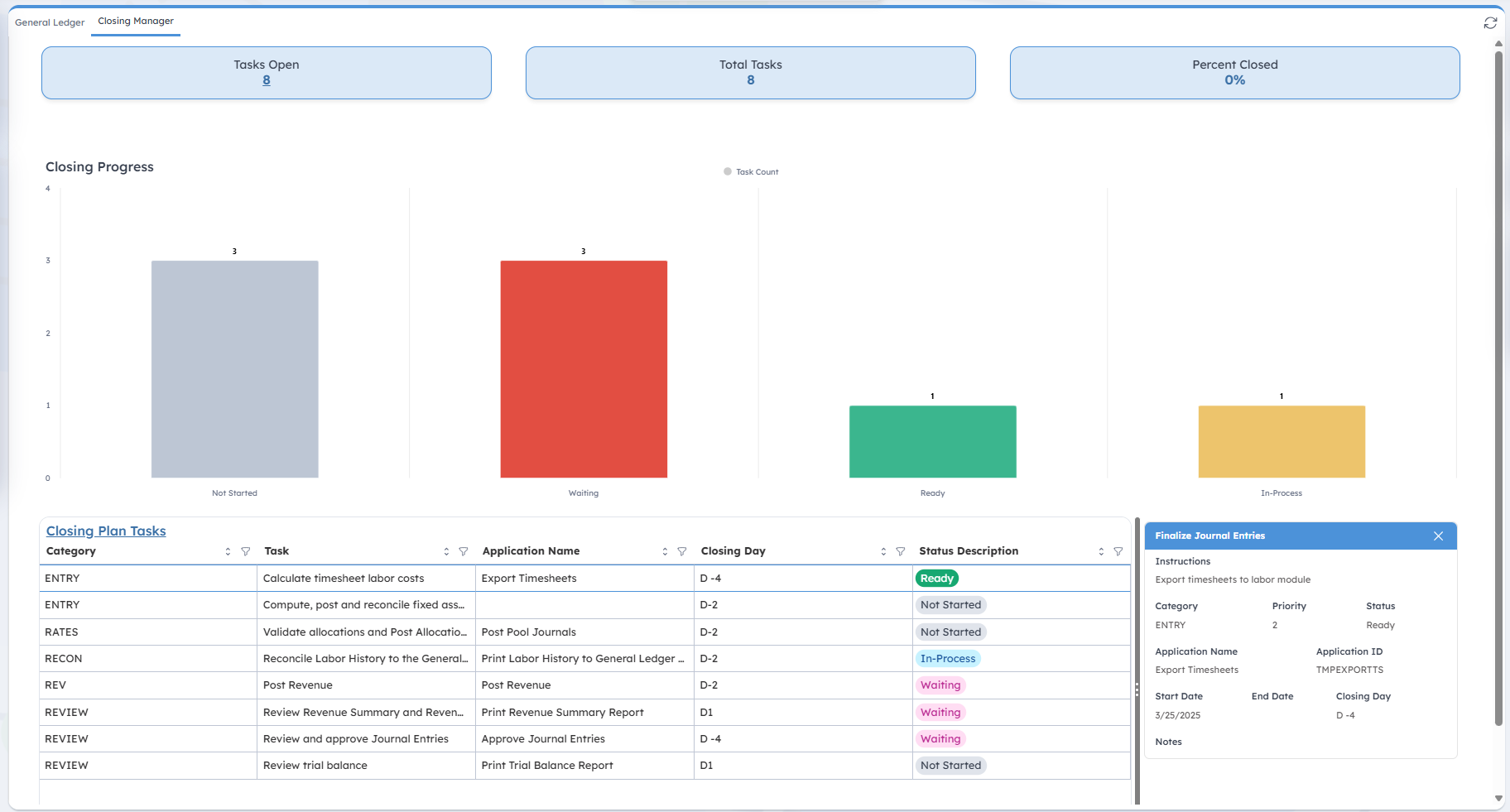
When you open the tab, you'll see three key metrics at the top:
| Field | Description |
|---|---|
| Tasks Open |
This displays the number of open tasks you still have to complete for closing the accounting period. Click the number to open the Closing Plan application. |
| Total Tasks |
This displays the total number of assigned tasks. |
| Percent Closed |
This displays the percentage of tasks completed. |
Closing Progress
This bar chart helps you assess your progress in completing closing tasks for the current period. Tasks are categorized as:
- Not started
- Waiting
- Ready
- In-Process
Closing Plan Tasks
This table provides details of all closing tasks assigned to you. You can click Closing Plan Tasks to open the Closing Plan application. The table includes the following columns:
| Field | Description |
|---|---|
| Category |
This column displays the task category. |
| Task |
This column displays the name for the task. |
| Application Name |
This column displays the Costpoint application required to complete the task. |
| Closing Day |
This column displays the closing day of the task. |
| Status Description |
This column displays the task status, which are:
|
 in the column headers. To filter data, click
 next to any column name and select your criteria.
Finalize Journal Entries
The Finalize Journal Entries side panel is displayed when you click any row in the Closing Plan Tasks table. It displays details of the selected task.
| Field | Description |
|---|---|
| Instructions |
This field displays instructions for completing the task. |
| Category |
This field displays the task category. |
| Priority |
This field displays the priority level for the task. |
| Status |
This field displays the task status. |
| Application Name |
This field displays the Costpoint application required to complete the task. |
| Application ID |
This field displays the application ID. |
| Start Date |
This field displays the task start date. |
| End Date |
This field displays the task end date. |
| Closing Day |
This field displays the closing day of the task. |
| Notes |
This field displays notes regarding the task. |