About Combining Records
The Combine Records utility allows you to merge client records in Ajera. For example, you could merge duplicate records or for merger and acquisition purposes. When you select client records to combine, Ajera merges the records and all existing details and transactions from the From client into the To client and deletes the From client record once the merge is complete. This is a permanent change and cannot be undone.
This process might affect other users or applications trying to access the same records. Before you combine client records, you should:
-
Perform a backup on your database before running the process.
-
Running or scheduling the merge during non-business hours.
-
Ensure all users are logged out of Ajera.
-
Ensure all Click-Once tasks are closed.
You can view details about any combine action taken in the bottom grid of the Combine Records utility.
Before proceeding with the Combine Records utility in Ajera, please review the following important considerations and requirements to ensure a smooth and successful merge process:
-
All details for the From client, including custom tabs and fields, will be deleted.
-
You will be able to combine contacts and/or attachments for the From client record into the To client record.
-
All existing transactions for the From client record will be merged into the To client record.
-
You will need to log out and log back in to Ajera after the merge process is complete.
-
Once the process is complete, you will be able to view the details of the merge in the Combine History section.
-
If you are using Ajera Payments: AR Automation (Bill & Pay integration), you will not be able to use the Combine Records utility.
-
This is permanent and cannot be undone.
Rules for combining client records
The record selected in the From field will be deleted after the merge with the To record is successful. A maximum of 5 unique combinations of clients can be combined at once.
Only 20 contacts are allowed on the client record. During the merge process, Ajera checks for duplicate contacts and only syncs those that do not already exist on the second record. If there are more than 20 contacts between the two records, the contacts for the From client will be synced in the order in which they appear in the database.
Integrations
Please review the table below to find any special information you need to be aware of for your integration.
| Archisnapper | If you integrate with Archisnapper, you can use Combine Records. | ||
| Bill & Pay | If you integrate with Bill & Pay, you cannot combine client records. | ||
| PIM |
If you integrate with PIM, you can use Combine Records.
|
||
| Vantagepoint CRM |
If you integrate with Vantagepoint CRM, you can use Combine Records. We recommend you follow this workflow to ensure client records are combined correctly and continue to sync as expected. |
Get to know the combine records interface
The combine records user interfaces is split into two parts: the Combine Clients section and the Combine Clients History section.
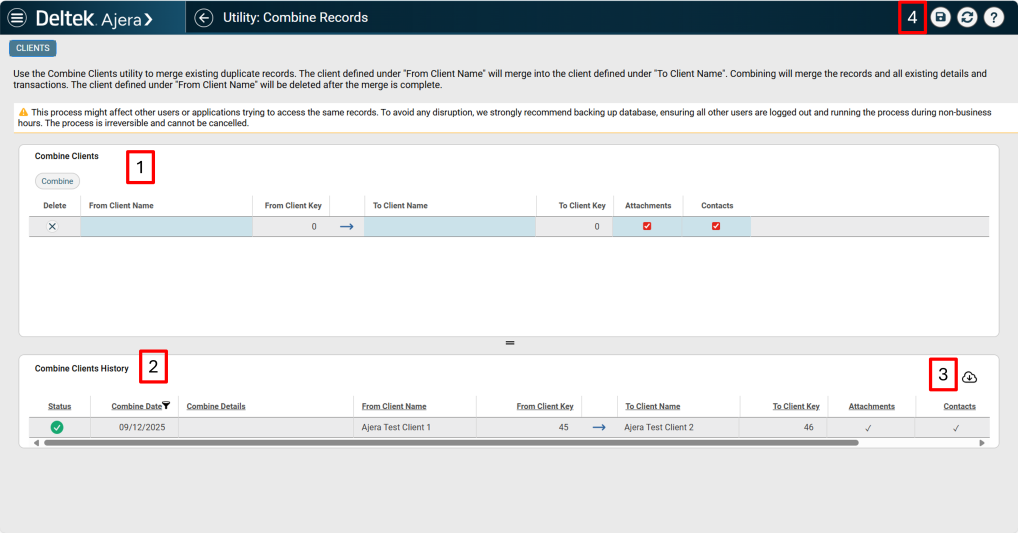
1. Combine Clients section
-
In this section you can select the clients you want to combine.
-
You can also select whether or not you want combine attachments and contacts associated with the clients.
-
You can combine more than one set of clients at the same time but you cannot select the same client on multiple rows.
2. Combine Clients History section
-
This section displays the history of clients that have been combined.
3. Download Combine Clients History
-
Click the
 icon located in the Combine Clients History section to download an Excel spreadsheet of the combined clients.
4. Save button
-
This is where the save button is located.
