How a Barchart Displays Information
A barchart view displays information about a project in rows drawn across two panes. Each row in an activity or multi-table barchart conveys information about a single activity.
In the case of a resource barchart, each row conveys information about a single resource assignment.
The pane on the left provides information in a spreadsheet with two buttons at the left edge of each row. The first button is used to select the row. One of three buttons may appear in the second position.
| Button | Description |
|---|---|

|
On an activity or multi-project barchart, this button indicates that the activity is an unexpanded subproject.
On a resource barchart, this button indicates that the resource is an unexpanded resource pool. |

|
On an activity or multi-project barchart, this button indicates that the activity is an expanded subproject.
On a resource barchart, this button indicates that the resource is an expanded resource pool. |

|
On an activity or multi-project barchart, this button indicates that the activity is not a subproject.
On a resource barchart, this button indicates that the resource is not a resource pool. |
The pane on the right displays information about each activity as a series of bars drawn against a time scale. Several bars may be used to convey different types of information about the activity For example, one bar on an activity barchart may represent early dates, another may represent late dates, and still another may represent baseline dates. Open Plan organizes these bars into bar sets, any one of which may be applied to the barchart view.
Open Plan displays all the bars that represent a single activity in a single row. In addition, a bar may represent a single activity or a subproject.
Activity bars may be defined so that they roll up (or are displayed) at the subproject level when the subproject is collapsed.
Open Plan displays a milestone on the barchart view as a bar on which the start and finish dates are typically the same (although, they do not have to be the same), using the symbol defined for the right edge of the bar. A barchart legend provides additional information about the data displayed. Use the Print Preview command to display the barchart legend.
If you have assigned resources to the project, a third pane at the bottom of an activity or multi-table barchart may display information about resource usage in a histogram.
Activity Relationships
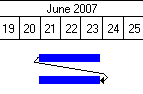
You can display the relationships between activities as lines that connect activity bars on different rows. The type of relationship is indicated by where the lines start and end. The left edge of an activity bar represents the start of an activity; the right edge represents the finish. These relationships can all be shown in a barchart view.
- Finish-to-Start: This is the default relationship type. It specifies that the start of the successor activity depends on the completion of the predecessor activity. In most cases, this means that the successor activity cannot start until the predecessor activity is completed. In the finish-to-start relationship, the arrow starts at the right edge of the predecessor activity and ends at the left edge of the successor.
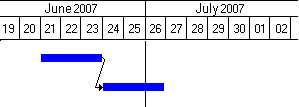
- Start-to-Start: This relationship specifies that the start of the successor activity depends on the start of the predecessor activity. In most cases, this means that the successor activity cannot be started before the start of the predecessor activity. In the start-to-start relationship, the arrow starts at the left edge of the predecessor activity and ends at the left edge of the successor.
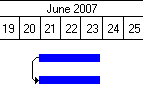
- Finish-to-Finish: This relationship specifies that the finish of the successor activity depends on the completion of the predecessor activity. In most cases, this means that the successor activity cannot be completed before the completion of the predecessor activity. In the finish-to-finish relationship, the arrow starts at the right edge of the predecessor activity and ends at the right edge of the successor.
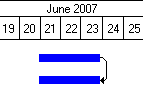
- Start-to-Finish: This relationship specifies that the finish of the successor activity depends on the start of the predecessor activity. In most cases, this means that the successor activity cannot be completed before the start of the predecessor activity. In the start-to-finish relationship, the arrow starts at the left edge of the predecessor activity and ends at the right edge of the successor.