Network View Legends
Network views can include a legend that describes the various types of activity boxes appearing in the view as well as a definition of the activity data appearing in each box.
Legends are not normally displayed on the screen but are produced when the view is output to devices such as printers or plotters. You can, however, display the legend by using either a special option to place the legend manually or by using the Print Preview command from the File menu.
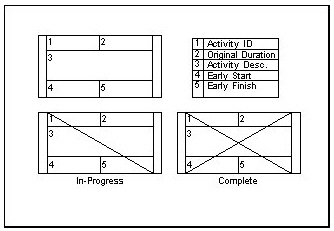
Open Plan provides a number of options for the placement and contents of a network legend. To set these options, click the Legend tab in the Network Preferences dialog box.
If you choose to display the legend on every page, Open Plan allows you to specify if the legend should appear on the top, bottom, left, or right side of the page. You can also choose to output the legend to a separate legend page.
The Manual option provides the most flexibility for displaying the legend. If you select this option, Open Plan displays the legend box in the view and allows you to position it manually or resize it. If a legend is too large to appear on a single page, you can place the legend across page breaks so that it appears on two or more pages.
Another way to customize a legend is to use the Manual option to display the legend in the view and then use the annotation feature to add additional information such as the name of the project or a signature block.