Capturing Actual Costs
There are several methods to capture actual costs in Open Plan.
These methods are as follows:
- Open Plan calculates actual costs: You can have Open Plan calculate the actual costs based on both progress information and the cost of the assigned resource.
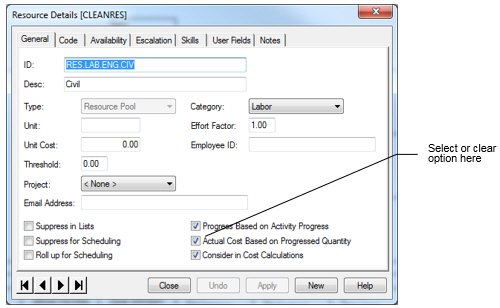
The manner in which Open Plan calculates actual costs depends on settings that you make on the General tab of the Resource Details dialog box for each resource assigned to an activity. For example, you can select the Actual Cost Based on Progressed Quantity option to have Open Plan calculate this value. If you select this option, the actual costs for a resource will be calculated and posted to the file when you run progress calculations. The actual costs posted will be calculated from the actual units (reported or calculated) multiplied by the resource rate.
If you then display the Activity Progress dialog box for an activity to which the resource is assigned, you can see that the Actual Cost field is shaded, indicating that you cannot edit the value and that it will be calculated by Open Plan.
- Manually enter actual costs: If you do not select the Actual Cost Based on Progressed Quantity option in the
Resource Details dialog box, you can enter the actual costs information manually at the activity level using the Resources tab of the
Activity Progress dialog box.
This dialog box allows you to enter actual costs for the following types of resources:
- Budgeted cost resources
- Budgeted standard resources
- Unbudgeted cost resources (that is, cost resources for which no assignments exist)
- Unbudgeted standard resources (that is, standard resources for which no assignments exist)
Since actual costs are spread over a date range, you must enter the start of the period for which you are entering actual costs; the end date is not required. You can enter both the actual quantity and actual cost for each resource. To add a new resource that was unbudgeted, add it to the bottom of the list.
By allowing you to enter costs for both budgeted and unbudgeted resources, Open Plan provides the flexibility required for situations in which costs are planned using one set of resources but are actually performed by a different set.
It is also possible to enter actual costs directly at the activity level without any reference to either cost or standard resources. For planners who are only interested in tracking actual costs, this feature allows for the capture of actual cost information without requiring the definition of budgets beforehand.
Attention: For more information about entering progress, see Entering Progress Information. - Import actual costs from a third-party system.