Time Entry
An intuitive and user-friendly time and expense module is available for end-users, allowing employees to easily enter time on a weekly or daily basis.
Note:
- Deltek Maconomy Touch is an add-on that employees can use to easily enter time via their mobile phones.
- Deltek Maconomy web client is designed for streamlined access to time and expense activities. The browser-based application is optimized for in-office as well as remote access use with both laptops and tablets.
Not all standard Maconomy functionality is available in the web client and Touch.
The time sheet enables employees to enter time by selecting the relevant project and task that they are working on. When using the People Planner add-on for resource management employees can automatically see the project for which they should enter time based on the projects they are assigned to.
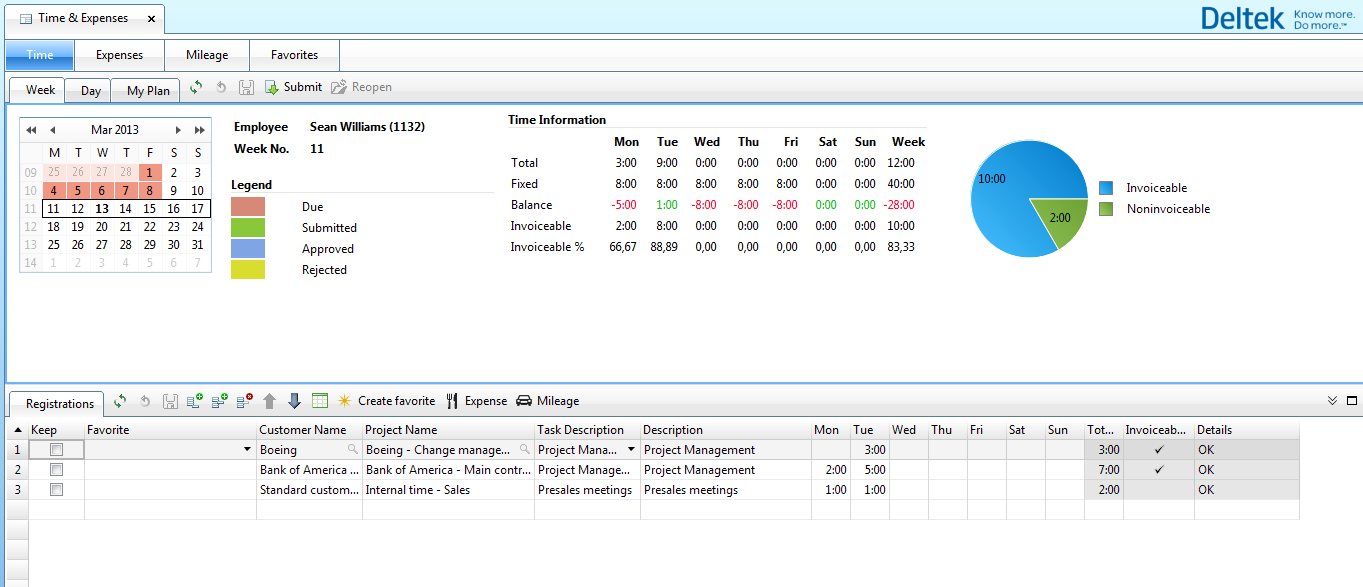
When an employee submits a time sheet, either the Line Manager or the PM can approve it.
To help the employee complete the time sheet as quickly and smoothly as possible, the solution includes:
- “Favorite” capability, allowing employees to create their own favorites for easy access.
- Permanent lines, allowing employees to select frequently used lines. These lines are shown automatically when a time sheet is created
- Search-as-you-type for easy retrieval of relevant projects and tasks
- You can propose a number of hours to be invoiced. For instance, if you enter eight hours per day you can specify that only six hours should be invoiced.