Cloud AD Account
SaaS Developers will also need a Cloud AD Account to access the development tools.
Your company's SaaS Customer Administrator creates your Cloud AD Account for you.
- The SaaS Customer Administrator will communicate to you your credentials.
- The SaaS Customer Administrator will assign the Cloud AD Account into the appropriate Group Memberships when the account is created.
| Group Membership | Access Types |
|---|---|
| {Client}-DEV | Grants access to database and development tools |
| {Client}-SQL | Grants access to database (TOAD) |
| {Client}-SQL-READONLY | Grants Read Only access to database (TOAD) |
| {Client}-CER-DB-PROD | Grants BI access to the Production Database |
| {Client}-CER-DB-SBOX | Grants BI access to the Sandbox Database |
| {Client}-CER-DB-CONFIG | Grants BI access to the Config Database |
| {Client}-CER-DB-TEST | Grants BI access to the Test Database |
| {Client}-CER-DB-DEV | Grants BI access to the Dev Database |
| {Client}-CER-DB-ADMIN | Grants BI Admin rights to Framework Manager |
| {Client}-CER-DEV | Grants BI Dev rights to Framework Manager |
| {Client}-CER-DB-ADV | Grants BI Adv rights to Framework Manager |
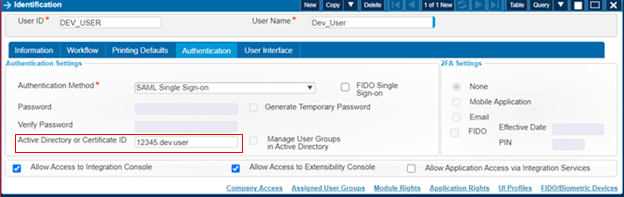
Important: If you are planning to access the Deltek Development tools (Extensibility/WIC) the SaaS Developer's Cloud AD Account must be associated with a Costpoint user account. To do this you will set up a user account in Costpoint as follows:
| Costpoint Field in Manage User Screen | Selection |
|---|---|
| Authentication Method | SAML Single Sign-on |
| Active Directory or Certificate ID field | Cloud AD Account username (12345.first.lastname) |
| Allow Access to Integration Console | Select this check box to provide this permission |
| Allow Access to Extensibility Console | Select this check box to provide this permission |
| Allow Application Access via Integration | Select this check box to provide this permission |
One or both of the check boxes, Allow Access to Integration Console and Allow Access to Extensibility Console, need to be selected depending on what the SaaS Developer will be working on. The Active Directory or Certificate ID field should match the SaaS Developer's Cloud AD Account (for example, 12345.Tammy.Tickle).