Contents of the Track Changes Tab (Classic Workspace and Office Master Workspace)
Use the contents of this tab ( ) to keep track of changes and revisions that you and other users made to an element's contents.
Note: The contents of the Track Changes tab are available only for eligible elements.
Contents
The following general contents are available:
| Item | Description |
|---|---|
 Show changes
|
Click this option to show or hide track changes in articles and paragraphs on the element form.
Note: Specpoint continues to track changes regardless of your selection of this option.
|
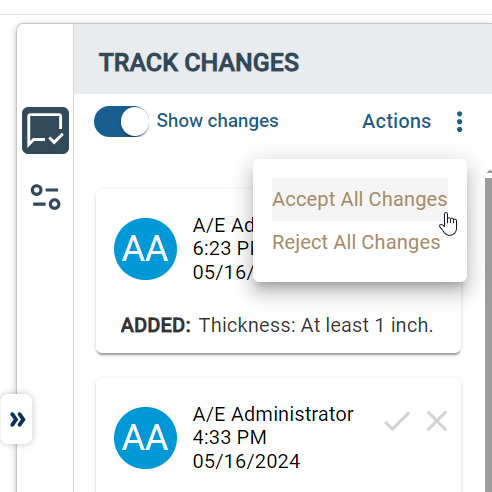
| Actions | Click this option and select any of the following options:
These options are available only if the element contains at least one track change. |
| Track Change Tips | This displays a list of track change tips. Each track tip represents a change that a user made to an element content item.
For assemblies and divisions, this tab displays the track change tips for their child families, sections, and product types. |
Track Change Tip
For each track change tip, the following information is available:
| Field | Description |
|---|---|
| Profile Photo Thumbnail | This displays a profile photo thumbnail of the project team user who made the change. If a profile photo is not available, this displays the user's initials. |
| Name | This displays the name of the user. |
| Time | This indicates the time when the user made the change. |
| Date | This indicates the date when the user made the change. |
| Change Type | This indicates the type of change done to the content item, such as Added or Deleted. |
| Changed Content | This displays the content that the user changed. |
| Show More or Show Less | Click Show More to show the full change description. Click Show Less to hide the full description. |

|
Click this icon to accept the track change. |

|
Click this icon to reject the track change. |
| Comments | This displays the available comments on the track change item from you and other users. |
| Add a reply | Enter a reply or comment to the track change item. You can comment on an in-progress or resolved, either accepted or rejected, track change tip. |
Track Change Comment
For each track change reply or comment, the following information is available:
| Field | Description |
|---|---|
| Profile Photo Thumbnail | This displays a profile photo thumbnail of the user who replied. If a profile photo is not available, this displays the user's initials. |
| Name | This displays the name of the user. |
| Time | This indicates the time when the user replied. |
| Date | This indicates the date when the user replied. |
| Comment Contents | This displays the content or message within the reply.
To edit your own comment, click
|
Submenu

|
This option is available only for your comments.
Click this icon and select any of the following options to modify your comment:
|