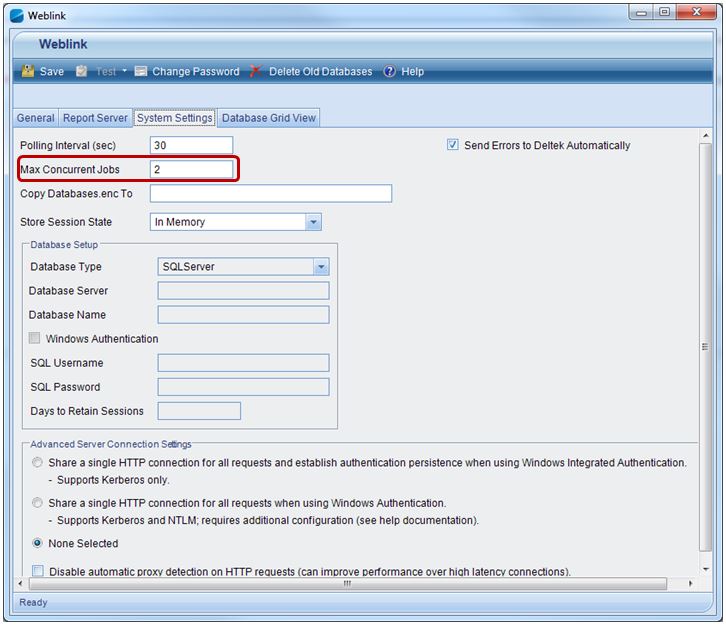
The Maximum field limits the number of concurrent jobs for a queue.
The Max Concurrent Jobs field limits the number of concurrent jobs running on the Process Server..
|
Field |
Location |
Purpose |
|
Maximum |
Web/Application Server Set in EPM Security Administrator on the System Settings Servers tab. |
Use the Maximum field to set the maximum number of jobs that can run concurrently for the selected queue. The number of jobs processing for the queue will never be more than the number in this field. The default setting for this field is zero which technically means that there is no limit to how many jobs from the selected queue can run concurrently; however, in reality it is limited by the maximum number of concurrent jobs that the Process Server can run (set in the Max Concurrent Jobs field). For more information, see the EPMSA Servers Tab of System Settings. |
|
Max Concurrent Jobs |
Process Server Set in EPM Security Weblink on the System Settings tab. Stored in the databases.enc file. |
Use the Max Concurrent Jobs field to set the maximum number of jobs that can run concurrently on the Process Server. The Process Server will never run more than this number of concurrent jobs, regardless of the setting in the queue Maximum field. The default setting for this field is 2. This can be changed in the databases.enc file; however, if you make a change, make sure you use the Copy Databases.enc to field on the Weblink System Settings tab to copy the file to all other Web/Application and Process Servers in your environment. For more information, see the Weblink System Settings tab. |
Process Server A Max Concurrent Jobs = 2
Process Server B Max Concurrent Jobs = 3
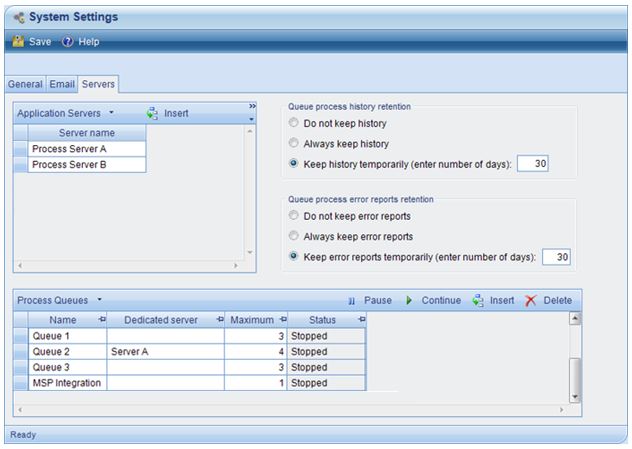
Note the following:
Each queue will never have more concurrent jobs running than the number set in the Maximum field, no matter what the Max Concurrent Jobs field is set to on the Process Server. It may, however, have less concurrent jobs running if the Process Server reaches its maximum concurrent jobs setting.
Queue 2 has a dedicated server, therefore Queue 2 jobs can only run on Server A.
The MSP Integration queue Maximum field is set to 1, therefore only one job from that queue can run concurrently; however, each job can run on the next available server since no dedicated server has been specified.
The queues have the following jobs, all scheduled to start at 9:00am:
|
Queue |
Jobs Scheduled |
|
Queue 1 |
6 jobs |
|
Queue 2 |
3 jobs |
|
Queue 3 |
3 jobs |
|
MSP Integration |
2 jobs |
At 9:00am:
Server A takes 2 jobs from Queue 1 because that is the maximum the server can run concurrently (as set in Max Concurrent Jobs field).
Server B takes 1 job from Queue 1, and 2 jobs from Queue 3.
Even though Queue 1 has a total of 6 jobs pending, the queue’s Maximum field is set to 3 concurrent jobs therefore Server B only takes 1 job from that queue since Server A is already running two jobs from that queue.
Server B takes a total of 3 jobs at once since that is the maximum that Server B can run concurrently (as set in the Max Concurrent Jobs field).
Server B cannot take any jobs from Queue 2 since that queue has a dedicated server (Server A).
After a job is complete, each server takes another job, taking care not to go over the maximum number of concurrent jobs set for each queue or the total maximum concurrent jobs for the server.
Server A will never have more than 2 jobs running concurrently.
Server B will never have more than 3 jobs running concurrently.
If the jobs had all been scheduled at different times, then the servers would process them at their starting times, still taking care not to go over the queue or server maximum concurrent job limits.