Enhanced Utilization Reports
This section describes the enhancements for the Utilization reports.
Overview
Previously the Maconomy standard utilization reports, as well as cloud utilization reports, included common metrics, such as invoiceable time compared to registered and fixed time. Other metrics utilized the hardcoded employee utilization types on activities. These were hardcoded in that they assigned productive time, invoiceable time, absence, holiday, etc. to specific utilization levels. To use the standard utilization reports, you had to set up the popup type with these specific levels.
From Maconomy 2.6.4, the utilization reports have been enhanced to make them more generally applicable, as well as fully covering the reporting needs for utilization across Maconomy installations (including cloud). These enhancements are outlined below.
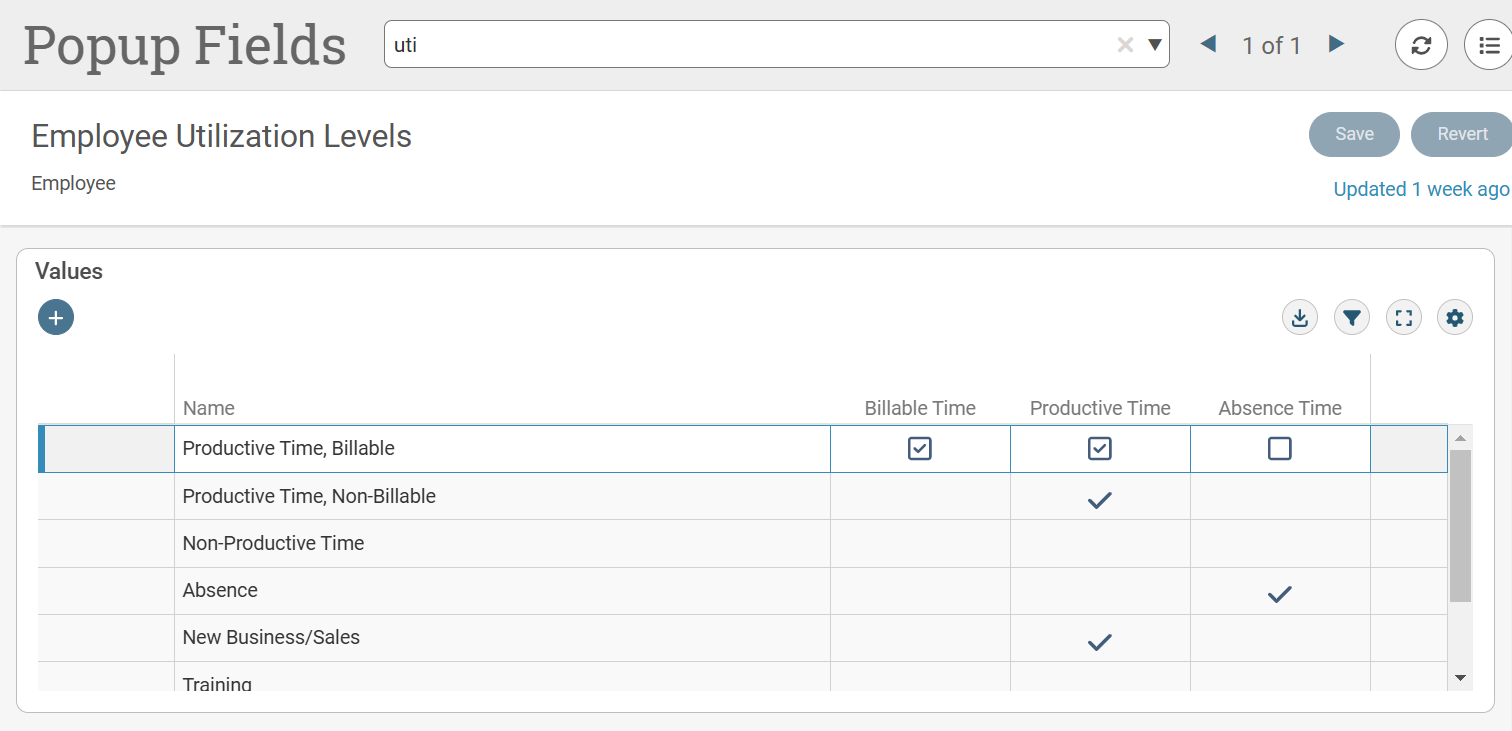
New Utilization Category for Absence Time
You can now categorize a utilization level as Absence Time, and use it in the Utilization universe and the utilization reports. New objects are introduced for reporting on the three categories we now have for utilization levels, as follows:
- Billable Time
- Productive Time
- Absence Time
Changes to the Standard Utilization Universe
Changed Drill Hierarchy
The drill hierarchy has been changed to Company » Entity » Employee Category » Employee » Job from the previous Company » Location » Employee Category » Employee » Job.
This change is done in the Utilization universe and is thus applicable to all reports using that universe. It also better fits customer needs and aligns with cloud/custom utilization reporting requirements.
New Utilization Measure Objects
There are three new utilization objects, as follows:
- Invoiceable Time
- Productive Time
- Absent Time
These objects show the registered time categorized by the Boolean set for the applied utilization popup value. For example, if the registration is eight (8) hours on an activity under the employee utilization, Sickness (which is assumed to have the Boolean field, Absent Time = True), then that registration adds to the time stated by the object.
Deprecation of Hardcoded Utilization Metrics
Previously, the objects in the Utilization Metrics folder of the Utilization universe were hardcoded to assume the PSO setup concerning utilization levels. This made it difficult for some customers to use these objects (and also the reports) as they may have had different utilization levels.
Currently, three categories on utilization levels can be used. The Utilization Metric objects have been deprecated. Deltek recommends you change custom reports to use the new approach of categorizing time.
Changes to Definition of Invoiceable Time
Previously, invoiceable time was defined based on whether the job and the activity was invoiceable. Currently, it is entirely the utilization level's category, Billable Time, that defines whether or not time is invoiceable. This means that all categorization of time is based on the three utilization levels.
Invoiceable Object for Jobs
The object, Invoiceable, is added to the Job folder. This object states whether or not the job is invoiceable.
Introducing Dynamical Dimensions in the Universe
Objects and parameters are added so you can select a standard dimension by which to slice data.
The universe is enhanced with the following objects:
- Dimension: This object prompt is for selecting a standard dimension and yields the concatenated number and name of the chosen dimension.
- Dimension No.: This object shows the number fields of dimensions. This is used in the list of values for the Dimension object.
- Dimension Name: This object shows the name field of the dimensions. This is used in the list of values for the Dimension object.
The dimensions are the dimensions of the employee, not the transactions.
The list of values (the dimensions by which it is possible to slice utilization data) are as follows:
- Company
- Location
- Entity
- Project
- Purpose
- Spec. 1~10
- Local Spec. 1~10
The list of values for dimensions must also include a blank dimension, which should be the default value; in reports, it means not having a section on a dimension.
Changes to Standard Utilization Reports
Changes to Hours Columns
The columns under the Hours header, are updated to reflect the following:
| Fixed | Reg. | Absent | Reg. Work. | Invoiceable | Productive |
|---|---|---|---|---|---|
| Fixed hours of the employee according to the week. | Hours entered for employees. | Registered hours for which the Absent Time of the Utilization popup type is true. | Activities for which the employee utilization is productive time. | Registered hours for which the Billable Time of the Utilization popup type is true. | Registered hours for which the Productive Time of the Utilization popup type is true. |
The Non-Prod. column displays the registered hours for which none of the Boolean (Reg., Absent, Prod.) of the Utilization popup are true.
New Dynamic Dimension Slicing
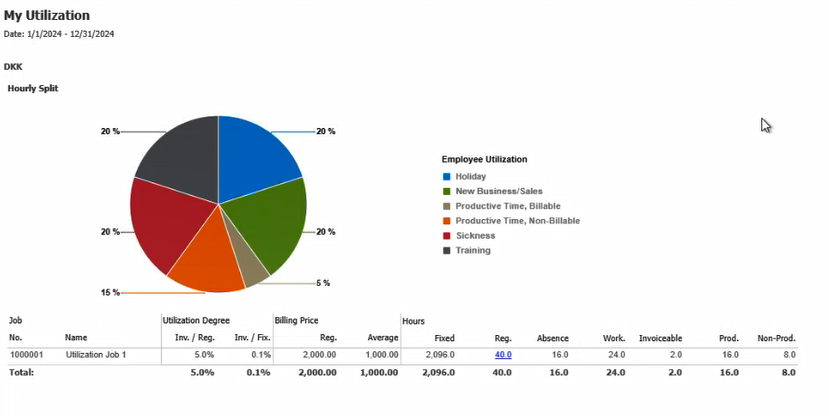
In each of the Utilization reports, it is now possible to slice data by a chosen standard dimension, for example, choosing the Specification 1 dimension sections data such that a table of utilization data is displayed for each different Specification 1 value. This makes it easy to analyze and display utilization data.
For convenience, the pie chart displaying the hourly split between the utilization levels has been moved so it is part of the dimension section. This way, the pie chart displays the hourly split that matches the values from the table of the report.
Example: My Utilization Pie Chart
New Report Tab with Period Charts
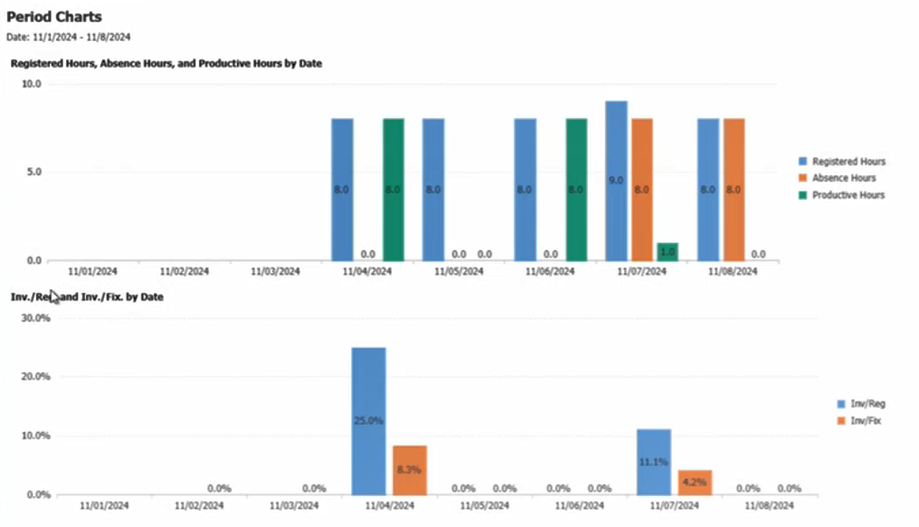
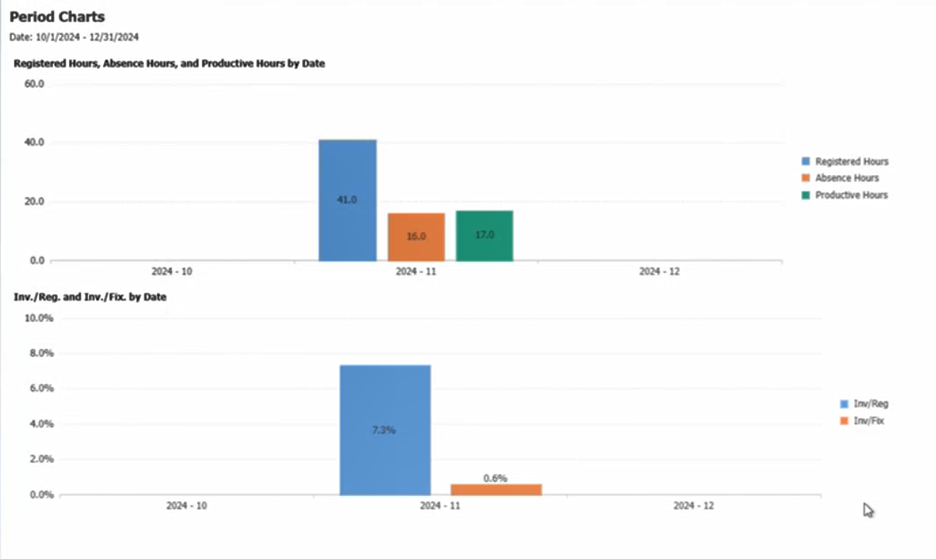
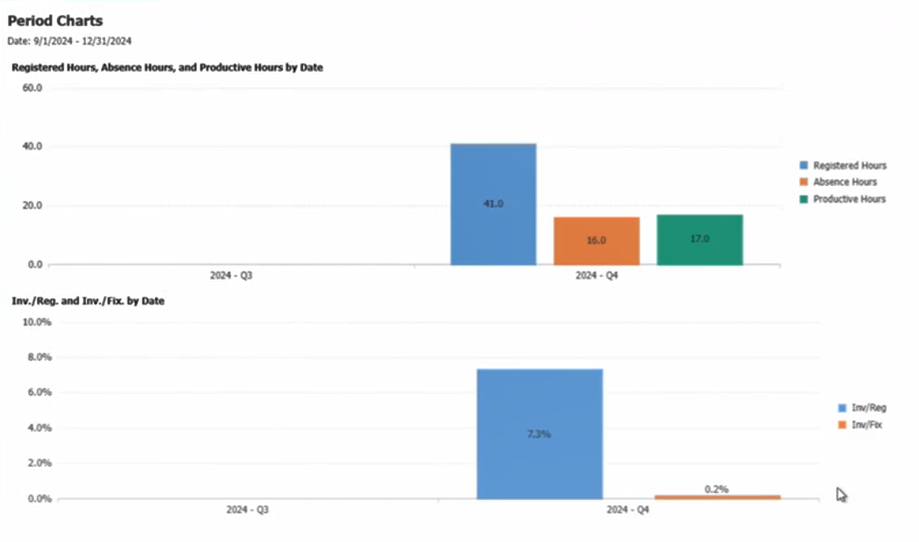
The standard utilization reports have been enhanced with a new report tab displaying utilization metrics over time. Some of the metrics are invoiceable time, productive time and absence time.
Depending on how wide a date range is selected, the charts display the figures by day, by month or by quarter. This gives a good and user-friendly overview.
Example: Daily View: Selected date from and to is less than or equal to 30 days
Example: Monthly View: Selected date from and to is greater than 30 days but less than 3 months
Example: Quarterly View: Selected date from and to is greater than 3 months
New Standard Report: My Utilization
This new report is modeled after the cloud utilization report collection. The report is similar to the standard Utilization report, but it only shows data for the employee running it. Also, it shows data by job. The report does not offer any drilling nor the ability of slicing by a chosen dimension.
Limitations
Utilization Degree Type Selection Not Available in Workspace Client
When generating standard utilization reports from the Workspace Client, the dynamic Utilization Degree Type selection is set to the default value, and the option to choose between Inv. and Prod. is not available. In contrast, it can be changed at the report level within the BI Launchpad.
This functionality is fully operational in the Web Client.
Static Values Not Localized
The popup text for the prompt on Utilization Degree Type (Inv. and Prod.) do not translate to other languages as static list of values are not localized in SAP BusinessObjects.