Option States
Use the different states of an option in an option set to identify whether it is open or resolved by either a user selection or entry.
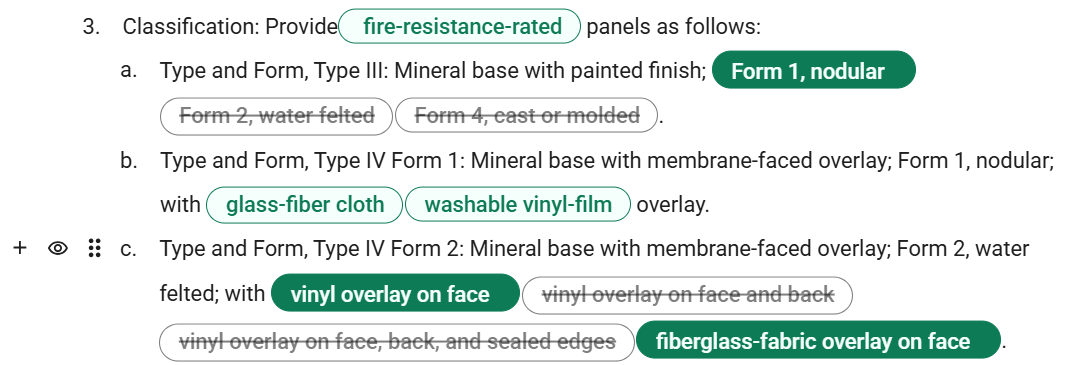
For paragraphs with option sets, an option selection or entry, determines whether a property in your specifications are fully-defined and resolved. This also controls which content is included in both the section preview and exported project files.
New Workspace
New Workspace

When you review option sets in added families, sections, and product types, the following option states are available:
| State | Example | Description |
|---|---|---|
| Default | 
|
The option is unselected and is within an unresolved option set, which is an option set that does not have any user selections or entries.
In the section preview and exported project files, all options in the option's option set display in bold and enclosed in square brackets ([]) to emphasize open selections. For example:
|
| Selected | 
|
This option is selected and is within a resolved option set, which is an option set that has at least one user selection or entry.
In the section preview and exported project files, this option displays alongside other selected options in regular formatting. For example:
If you have the best practices feature enabled for your firm, a selected pill includes a menu option ( |
| Inactive | 
|
This option is not selected but another option within its option set is selected. The option set is resolved through other selections or entries. In the section preview and exported project files, the option is not visible. For example:
An option set can have all inactive options. However, this can cause an incomplete paragraph based on the given paragraph's context. For example:
|


 ) for displaying the best practices dialog box. You can also right-click the pill to set it as a best practice.


Classic Workspace

When you review option sets in added families, sections, and product types, the following option states are available:
| State | Example | Description |
|---|---|---|
| Default | 
|
The option is unselected and is within an unresolved option set, which is an option set that does not have any user selections or entries.
In the section preview and exported project files, all options in the option's option set display in bold and enclosed in square brackets ([]) to emphasize open selections. For example:
|
| Selected | 
|
This option is selected and is within a resolved option set, which is an option set that has at least one user selection or entry.
In the section preview and exported project files, this option displays alongside other selected options in regular formatting. For example:
If you have the best practices feature enabled for your firm, a selected pill includes a menu option ( |
| Inactive | 
|
This option is not selected but another option within its option set is selected. The option set is resolved through other selections or entries. In the section preview and exported project files, the option is not visible. For example:
An option set can have all inactive options. However, this can cause an incomplete paragraph based on the given paragraph's context. For example:
|
 ) for displaying the best practices dialog box. You can also right-click the pill to set it as a best practice.