Configure Characterset Settings if Using Oracle
This section discusses how to configure characterset settings if using Oracle and Oracle Instant Client (OIC).
The Oracle character set settings ensure that values are displayed correctly on the BusinessObjects (BO) universe and ad-hoc reports.
BusinessObjects (BO) needs to know the characterset of Oracle to correctly display characters. You should set the environment variable NLS_LANG on the BO server.
To configure characterset settings, follow these steps:
- On the BO server, determine the
NLS_LANGUAGE and
NLS_CHARACTERSET using the following statement:
SELECT * FROM NLS_DATABASE_PARAMETERS WHERE PARAMETER IN ('NLS_LANGUAGE','NLS_CHARACTERSET')
Tip: For the default setup, the result is AMERICAN, WE8ISO8859P1. - On your Windows computer, open the Run dialog box and type sysdm.cpl.
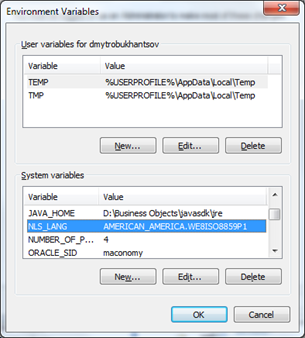
- Select Advanced tab » Environment Varaibles.
- Set the environment variable,
NLS_LANG, to the concatenation of these two strings separated by a dot, for example,
AMERICAN.WE8ISO8859P1.
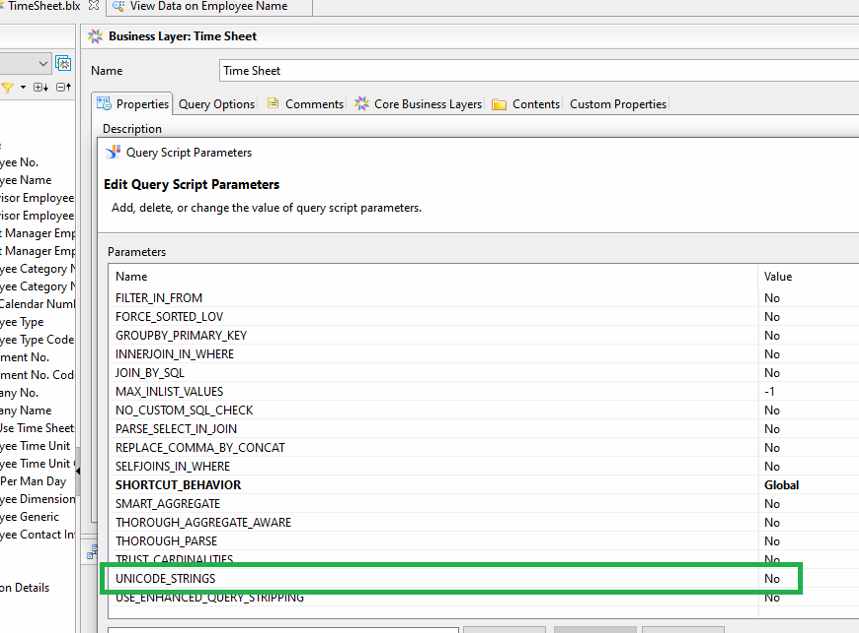
- On the Information Design Tool (IDT), check that the
UNICODE_STRINGS parameter is set to
No (default).