Work Breakdown Structure Components
Your enterprise can enable up to three work breakdown structure levels. Each of those levels can be subdivided using delimiters. For individual projects, you can then use all or only some of the enabled levels.
WBS Level Names
The default names of the three WBS levels are "project", "phase", and "task".
| Level | Default Label | Alternative Label |
|---|---|---|
| 1 | Project | Contract |
| 2 | Phase | Task |
| 3 | Task | Deliverable |
To substitute custom labels for the standard WBS level labels, use the Labels form () to change the labels for WBS1, WBS2, or WBS3. After you save those label changes, your custom labels are used throughout the Vantagepoint user interface and the online help.
This topic uses the default WBS level labels throughout. Elsewhere in the Vantagepoint help, your labels are used.
WBS Hierarchy
When you set up the WBS for a project with more than one WBS level, you create a hierarchy, with the project as a whole at the top and phases, or both phases and tasks, as lower levels
-
Project: A
project is an individual job. A
project can be any of the following:
- A regular, revenue-producing job.
- A way to collect overhead information. For example, when your payables clerk spends the day making payments to vendors, the clerk charges that labor to an overhead project. Other overhead collection projects may include a Vacation project, a Sick project, or a General Overhead project.
- A way to collect and track information and resources associated with pursuing and winning a specific revenue-producing job.
- A way to collect and track information and resources associated with a marketing campaign.
- If you use organizations, a project can be a way to guide non-project-related transactions to the appropriate organization’s balance sheet accounts.
- Phase: A phase is an explicitly defined sub-project or independently managed component of a project. Use phases to group labor and expense activity within a project. A phase is usually an element of work performed during the course of a project with an expected duration, an expected cost, and expected resource requirements. Each project can, and typically does, have its own set of phases. Phases can be further divided into tasks.
- Task: A task is an explicitly defined sub-phase or independently managed component of a phase. Use tasks to group labor and expense activity within a phase. A task is usually an element of work performed during the course of a phase with an expected duration, an expected cost, and expected resource requirements. Each phase typically has its own set of tasks.
Use phases and tasks to identify and track individual segments of a project by type or duration, by independently managed components of the project, or by any other discrete project elements that exist within the larger project. Typically, companies use phases and tasks to accommodate internal and external reporting needs (for example, when different departments are responsible for different parts of a project) and/or to meet client billing requirements.
If Vantagepoint is set up to use phases, or both phases and tasks, you can decide on a project-by-project basis whether to use those levels. In addition, a project's WBS does not have to have a uniform structure across the branches of the hierarchy. For example, Phase A for a project could be further broken down into Tasks 1, 2, and 3, while Phase B could have no tasks under it.
If you decide to use lower WBS levels for a project, every labor and expense transaction entered for the project must reference all WBS elements in a branch of the hierarchy, down to the lowest level used. Using the example in the preceding paragraph, if you enter time for Phase A, you must also specify one of the tasks under that phase. However, if you enter time for Phase B, you do not specify a task because that branch of the WBS does not use the task level.
If you use Vantagepoint to bill clients for your projects, you cannot bill phases and tasks individually, but you can establish separate billing terms for each phase and task, and you can show billing information for phases and tasks separately on invoices.
WBS Elements
- Contract value
- Organization
- Project manager and principal
- Revenue method
- Start and end dates
- User-defined field values
Each WBS element also has its own identifier. For example, a branch of a project WBS might include elements with these IDs:
| Level | ID |
|---|---|
| Project | 9300 |
| Phase | 01 |
| Task | 08 |
However, the full identifier for a lower-level WBS element in the context of a specific branch of a WBS is a combination of its higher-level parent IDs and its own ID. In the above example, the full project ID is 9300, the full phase ID is 9300.01, and the full task ID is 9300.01.08.
Vantagepoint supports the following maximum and minimum lengths and number of internal delimiters for IDs:
| Level | Default Label | Maximum Length | Minimum Length |
|---|---|---|---|
| 1 | Project | 30 characters, including two delimiters | 3 characters |
| 2 | Phase | 7 characters, including one delimiter | 1 character |
| 3 | Task | 7 characters, including one delimiter | 1 character |
You define the length and delimiters for WBS levels for your enterprise as a whole, using the Key Formats utilities.
WBS Element Delimiters
A delimiter is a character that is used to separate one segment of an ID from another. In addition to the delimiters in a full WBS element ID that separate the segment for one WBS level from that of the next level, you can also use delimiters within your project, phase, and task IDs to create additional levels of structure:
- Project delimiters: One or two delimiters that are used to create up to two additional levels of structure at the project level, which you can bill individually. The sub-projects that you create with delimiters are similar to phases and tasks, except that you can bill delimiter sub-projects individually.
- Phase or task delimiters: These single delimiters are used to create a structure below the phase and task level to capture more detail.
- . (period)
- : (colon)
- - (dash)
If you use all three WBS levels and all of the supported internal delimiters, a WBS element could have up to six delimiters and seven segments in its full ID. For example:
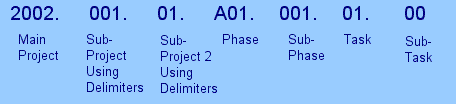
Extending the WBS Using Labor Codes
While not a formal part of a project's WBS, labor codes provide a way to extend the WBS to enable labor budgeting and to enhance planning, tracking, and reporting on labor hours and amounts.
- The department associated with a labor charge.
- The project phase or task associated with a labor charge, if you only want to budget labor for a particular aspect of a project and don't need to set up phases or tasks as part of the WBS.
- The service provided by the employee.
- The staff level of the employee.
Labor codes can have up to five levels, with 14 characters total.
Unlike a set of phases or phases and tasks, which you define on a project-by-project basis, labor codes are defined for your enterprise as a whole. All projects make use of the same standard set of labor codes. If you decide to use labor codes, they are required for all timesheet transactions, to identify each hour of labor.
You do not have to set up Vantagepoint to use labor codes. Without labor codes, your work breakdown structure may still contain enough information to meet your administrative needs for tracking work on a project. However, there are other benefits to using labor codes. In Vantagepoint, all labor costing and budgets are based on labor codes. You also have the option to add labor codes to project plans below the lowest-level WBS elements so you can plan labor hours in more detail than the WBS allows. And if you enter project budgets or do project planning at the labor code level, you can use the Budget Validation options on the Accounting tab of the Projects form to implement automatic validation of time records against the budget or plan based on the labor codes that the employee enters for the time records. For more information, see Accounting Tab of the Projects Form and Budget Validation for Timesheets.