Event Plans Concepts
An event plan outlines the sequence of events to be created based on the outcomes of the preceding events.
In an event plan, you can, for example, specify that if the first call to a customer results in the customer accepting the invitation to a meeting, Maconomy should automatically create an event with certain information, whereas no further events should be created if the customer declines.
Event plans are used in relation with event flows, where multiple events are created, each following a distinct path depending on the outcome of the preceding event.
An event plan consists of event templates, which are entered as lines in the Details table. These event template contains event-related information such as contact mode, event type, employee number, item number, description, result type, and condition result. You can also set a date to generate events from each template.
Each event template includes a condition dictating when events should be generated from the template. The condition is typically based on the result of the preceding event, for example, whether a customer answered yes or no to a question during a phone conversation.
An event created as a result of the outcome of an existing event is called a secondary event.
In an event plan, you also create one or several templates for initial events. An initial event is an event created as the first step in a campaign, that is, an event created when the campaign is initiated. Templates for initial events are created in exactly the same way as templates for secondary events, except for the fact that on initial event templates you do not enter a condition for the creation of events.
An event plan can have several levels, which can be practical if a secondary event can have different outcomes, each of which should result in further secondary events. This functionality is illustrated in the figure below, where the sharp-edged boxes represent events, whereas boxes with rounded edges represent possible results of the event above:
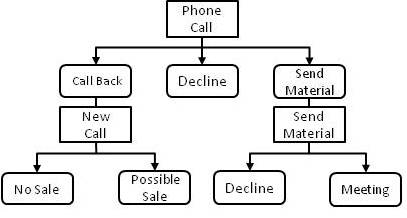
The following explanation of the illustration is based on a scenario with one event assigned to a campaign. However, the procedure described applies to all events in an event flow to which an event plan has been assigned.
In this example, the customer is first contacted by phone. This contact is represented by an event (created as an initial event, based on an event template in the event plan of the flow). In an option list, the following outcomes of the phone call have been set up: "Call back," "Decline," and "Send material." This option list has been assigned to the initial event, allowing the employee who contacts the customer to select one of these options, thus specifying the result of the event.
As two of these possible outcomes should result in further contact with the customer in different forms, the event plan also contains an event template for each of these two results. On one of these event templates, it has been specified that if the result of the first contact is "Call back," an event should be created from the event template. Similarly, it has been specified on the other event template that if the result of the first contact is "Send material," an event should be created using the information from this template.
In this workspace, you can:
- Create an event plan and add event templates to it.
- Edit an event plan.
- Delete an event plan.