User Setup and Single Sign On
This section discusses Maconomy user setup and single sign on.
In Maconomy, access to data is controlled by the user name (NameOfUser). If single sign-on (SSO) is not defined and used, a user must log into BusinessObjects using the same user name to be able to access data.
However, SSO is defined both in Maconomy and BusinessObjects, as follows:
- In Maconomy, a network user name is defined for each user. This network user name is equal to the Active Directory (AD) (Windows) user name. When you log into the network, the login is automatically performed in Maconomy using the network user name. Access to data is controlled by the user name with which the network user name is associated.
- In BusinessObjects, the AD (Windows) user name is the normal user name, and is therefore equal to the network user name. To have access to Maconomy data, you create an alias for that user name. This alias is equal to the user name (NameOfUser) in Maconomy. When you log into the network, the login is also automatically performed in BusinessObjects using the user name. Access to the Maconomy data is via the alias that matches the user name (NameOfUser) in Maconomy.
The following figure illustrates this.
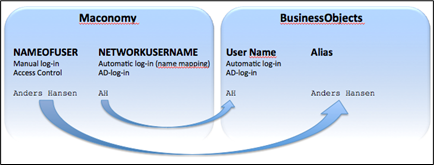
Example
- In Maconomy, Anders Hansen uses AH as the network user name (and thus also AD log-in).
- Anders Hansen logs into the network and automatically logs into Maconomy as AH.
- This gives Anders Hansen access to all of the Maconomy data to which his user name is defined to have access.
- When opening WebIntelligence in BusinessObjects, Anders Hansen is automatically logged in as AH.
- The BusinessObjects user AH has the alias Anders Hansen. Therefore, the user has access to all of the Maconomy data that Anders Hansen is defined to have access to.
Active Desktop and Maconomy Configurations
Users must exist as AD (Windows) users on the domain. The mapping in Maconomy must be set up properly so that each Maconomy user has an AD (Windows domain) user name specified in the Network Username field in the Users workspace in Maconomy.
For example, the person Anders Hansen might have the user name AHA on the domain. The Network user name for the Maconomy user Anders Hansen should therefore be entered as AHA.