Customizing ETL
This section describes the steps you need to follow to customize ETL.
General Rules
- All customizations to Extract, Transform, and Load (ETL), meaning jobs or transformations, should be done by new jobs and transformations dedicated to handle a certain customization.
- These custom jobs and transformations must be placed in a folder called "custom" or "Custom" in the repository.
- No standard jobs or transformations should be changed.
- The folder structure (aside from that in the "custom" folder) should remain unchanged.
- New jobs or transformations for loading custom-defined data should be scheduled or run manually after the standard LoadData job has completed, or after a custom version of LoadData has been executed.
- When upgrading, customizations may need to be reconsidered:
- An upgrade may introduce standard functionality that previously has been implemented by customizations. It is recommended to include the standard functionality in favor of the customizations, if they fully satisfy the needs of the customer.
- An upgrade may change field names or semantics of fields. Consequently, customizations need to be adjusted carefully.
- An upgrade may declare fields or tables as deprecated (for example, if they are replaced by others, or are not included in Maconomy anymore). Customizations that rely on such fields and tables should be considered changed. In some situations, it may be convenient for the customer to change the customizations in such a way that they still rely on old functionality - for example, deprecated fields. Deprecated fields or tables that are removed by the upgrading process can then be reintroduced in custom tables. Note that a dump of the content of the deprecated table must then be done as part of the upgrade process.
- Carefully document the steps performed in the customization. These can easily be reconsidered and possibly redone after an upgrade. Primarily, document the following:
- Which standard tables the custom tables are based on.
- Which fields have been added to the copies of the standard tables.
- The links that have been made.
Note: When running ETL jobs that load data to the Data Warehouse, one of the
Number fields on Maconomy may fail while being converted to string (data type) before loading. We recommend temporarily disabling the cache on steps that fail until this issue gets resolved.
Transaction Time Stamps for Customized ETL
If the data warehouse ETL has been customized, additional tables may need to have transaction time stamps enabled. For example, if additional tables are maintained by the customized ETL and incremental load is defined for these tables, the corresponding tables in Maconomy must have transaction time stamp triggers enabled.
Enable transaction time stamp
Check Enable Transaction Time StampsThis action enables transaction time stamp triggers for all Maconomy tables, and thus also the tables used in the ETL customization.
- Log into MConfig.
- Go to the Application Instance Configuration.
- In the Business Process Management section, check
Enable transaction time stamps for the database short name.
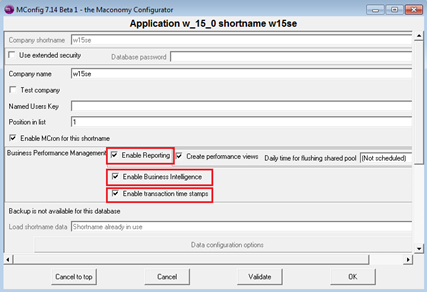
- Click OK.