General Ledger Tab
The General Ledger tab enables you to review journal entries (JE), Accounts Payable (AP) vouchers, and cash receipts, as well as track their pending approvals.
It displays JEs you created or those awaiting your approval, helping you monitor workflows and maintain control over JE lifecycles It also links to related Costpoint applications. Click the info icon in the upper-right corner of any chart or table to see a quick explanation of what it shows and how to use it.
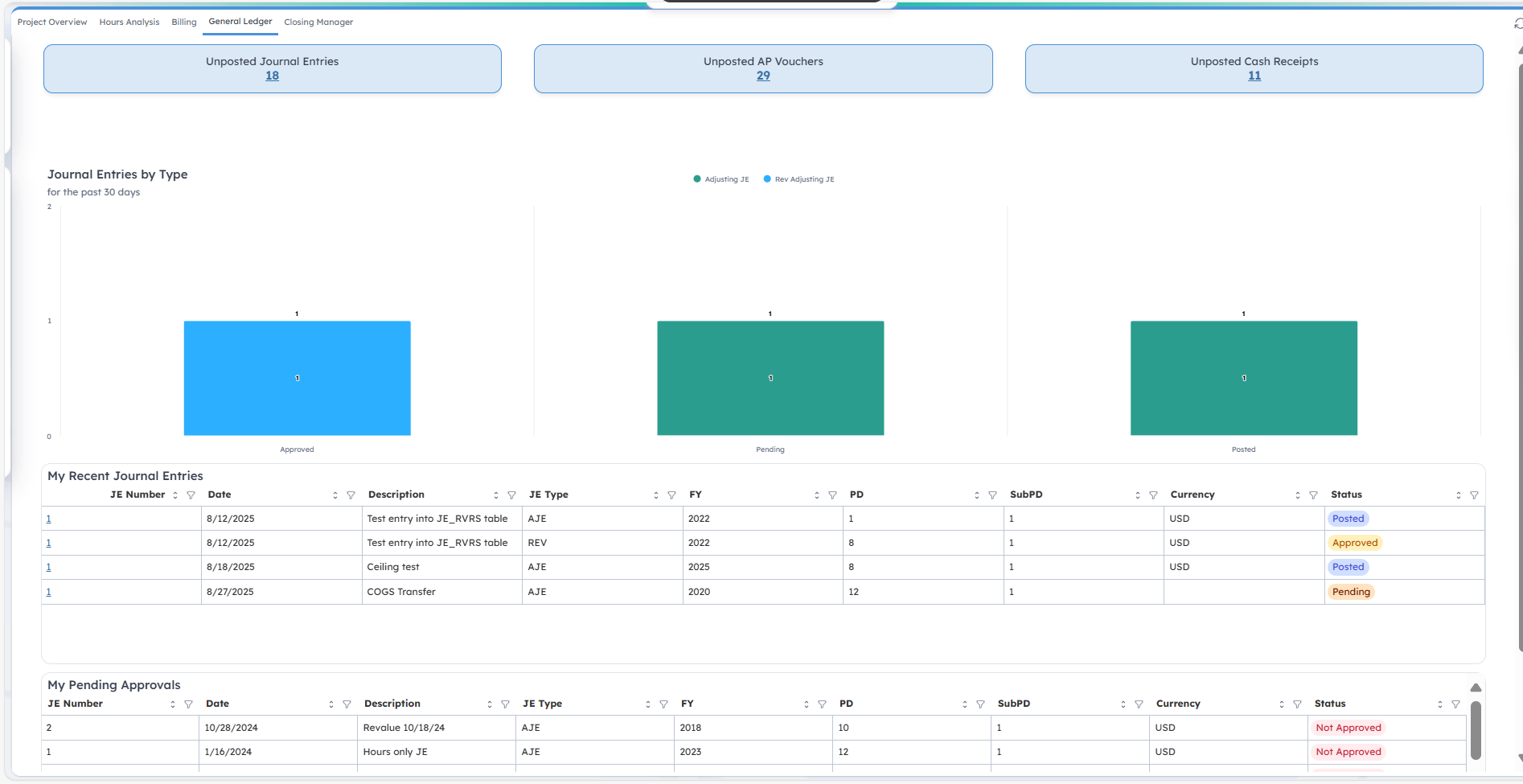
When you open the tab, you'll see three key metrics at the top:
| Field | Description |
|---|---|
| Unposted Journal Entries |
This displays the total number of JEs that have been created but not yet posted or approved. Click the number to open the View Journal Entries screen. |
| Unposted AP Vouchers |
This displays the total number of AP vouchers that have been created but not yet posted or approved. Click the number to open the View Voucher History Inquiry screen. |
| Unposted Cash Receipts |
This displays the total number of cash receipts that have been entered but not yet posted. Click the number to open the View Cash Receipts screen. |
Journal Entries by Type
This bar chart highlights the number of JEs in the last 30 days based on type and status. JE types are:
- AJE: Adjusting Journal Entries
- REV: Reversal Journal Entries
- RJE: Recurring Journal Entries
- RRV: Reversal Recurring Journal Entries
- PJE: Project Transfer
- MJE: Multi-Job Allocations
- BSR: Balance Sheet Revaluation
- IWA: Intracompany Work Assignment
JE status is either Approved, Pending, or Posted.
My Recent Journal Entries
This table provides a list of JEs created within the last 30 days. It helps you track recent activity and identify entries that are still pending. The table includes the following columns:
| Field | Description |
|---|---|
| JE Number |
This column displays the identification number for the JE. This is a clickable link that opens the View Journal Entries screen. |
| Date |
This column displays the date when the JE was entered. |
| Description |
This column displays the JE description. |
| JE type |
This column displays the JE type. |
| FY |
This column displays the fiscal year in which the JE was entered. |
| PD |
This column displays the period in which the JE was entered. |
| SubPD |
This column displays the subperiod in which the JE was entered. |
| Currency |
This column displays the transaction currency. |
| Status |
This column displays the JE status, which are:
|
 in the column headers. To filter data, click
 next to any column name and select your criteria.
My Pending Approvals
Use this table to monitor JEs assigned to you for approval. The table includes the following columns:
| Field | Description |
|---|---|
| JE Number |
This column displays the identification number for the JE. This is a clickable link that opens the Approve Journal Entries screen. |
| Date |
This column displays the date when the JE was entered. |
| Description |
This column displays the JE description. |
| JE type |
This column displays the JE type. |
| FY |
This column displays the fiscal year in which the JE was entered. |
| PD |
This column displays the period in which the JE was entered. |
| SubPD |
This column displays the subperiod in which the JE was entered. |
| Currency |
This column displays the transaction currency. |
| Status |
This column displays the JE status, which are:
|
in the column headers. To filter data, click next to any column name and select your criteria.