Update the Duplicate Project Names
Follow this procedure to update the duplicate project names.
To update the duplicate project names.
-
Identify if there are multiple rows with the same case and value in both the
Project ID and
Dir ID columns from the returned results after
identifying the duplicate project names.
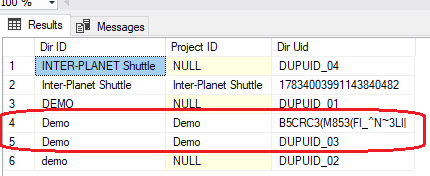
Having multiple rows with the same case and value in the Project ID and Dir ID columns indicates duplicate records. You need to address these duplicates so that only one row remains with the same case and value in both the Dir ID and Project ID columns. In the example above, one of the Demo projects highlighted in red must be updated, as it is marked as a duplicate of the other.
To help you determine which record is a duplicate, you can check for existing access rights related to the project record. If a record has access rights defined and the others do not, the record with access rights is the one to keep.
To check for access rights records related to a project record:
- Run the following query for each record that has the same name and value in the
Project ID and
Dir ID columns.
SELECT COUNT(1) FROM WST_ACL WHERE DIR_UID = ‘<Dir Uid>’Note: Replace <Dir Uid> with the Dir Uid value for the row you are checking. - If the query returns a value greater than 0, the project record has access rights defined.
- Perform Step 2 for each duplicate record.
- Run the following query for each record that has the same name and value in the
Project ID and
Dir ID columns.