Creating Activities in a Network View
Use this procedure to create activities in the Network View.
To create an activity in the network view:
-
Take one of the following actions:
- Create an Activity: Double-click on an empty area in the workspace.

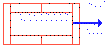
- Create the Next Activity: Drag a line from the right edge of the activity box out into an empty area in the workspace.
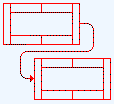
- Create a Relationship between Two Activities: Draw a line connecting the activities.
- Create an Activity: Double-click on an empty area in the workspace.