Security Tools
The Deltek family of products provides a comprehensive set of security-related features that enable a system administrator to control access to both an application and its data.
These features are accessed through the PPM Administrator or EPM Security Administrator (EPM SA), a common security utility designed to work with Deltek’s software applications.
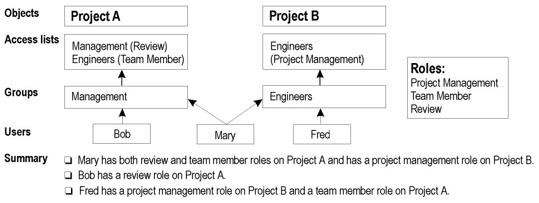
The Security Administrator Model is designed around four interrelated elements:
- User: This is the individual.
- Group: This is the group of which the user is a part. While groups are frequently functional entities within the organization, this is not necessarily the case, and a user may be a member of any number of groups.
- Role: This is the functional role that the group or user has under a given set of circumstances.
- Object: These are the items to which a group (and ultimately, the user) can have rights. For example, an object may be a project, an ancillary file, or a view.
The following is an illustration of the way in which users, groups, roles, and objects are related:
Login Lockout
Using the security tool, a user with system administrator access can prevent users from logging into Open Plan. When users try to log into Open Plan, they receive a message stating that the system administrator has disabled logins to the data source. Clearing the message returns the users to the Open Plan Login dialog box, where they can cancel the login attempt completely or use CTRL+Login to select another data source.
This function would be useful, for example, if maintenance needed to be performed on the database. If even one user was logged in, the maintenance could not be performed.
Login Message
Using the security tool, a user with system administrator access can specify a message that is displayed to all users when they log into Open Plan. This function would be useful, for example, to warn users of scheduled downtime for upcoming database maintenance.
Session Termination
Using the security tool, a user with system administrator access can remotely terminate the Open Plan session for any user logged into the program. When a user’s session is terminated, the user receives a warning message that Open Plan has been terminated by the system administrator and will automatically close in 10 seconds.
Please note that any unsaved changes to Open Plan are lost when the program is remotely terminated by the system administrator. After the termination message is displayed, users cannot perform any actions in Open Plan. Hopefully, the system administrator sent a message to the users informing them to save their information before issuing the session termination.
User Notification
Using the security tool, a user with system administrator access can send a message to any user logged into Open Plan. Messages can be sent to individual users or several users at once.
This function is similar to the Send Message command on the Open Plan File menu.
This function would be useful, for example, if the system administrator needed to inform all users to log out so that database maintenance could be performed.