Inventory Disposition Report
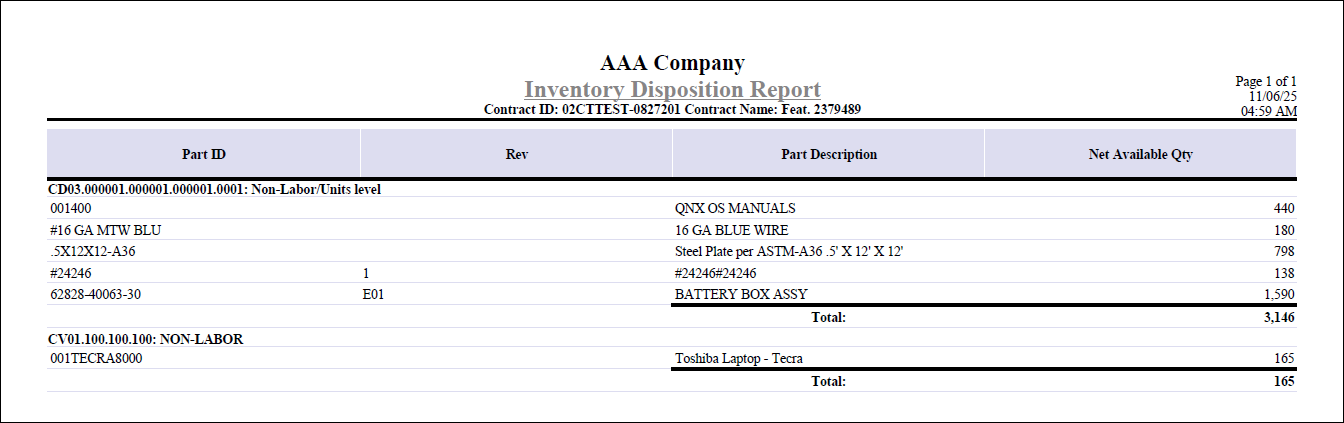
The Inventory Disposition Report offers a detailed view of inventory items for projects linked to a contract, helping you track the status of materials during contract closeout.
You can print this report by clicking the Print Report button next to the Inventory Dispositions? field on the Contract Closeout tab of Manage Contracts.
The report lists each item's key details and summarizes the total available inventory, making it easy to identify any remaining quantities that may require disposition.
For each inventory item, the report displays:
- Part ID
- Revision
- Part Description
- Net Available Quantity
- Project ID
The report calculates and displays the total net available quantity for all listed items. Only items with a nonzero available quantity are included, ensuring the report focuses on inventory that may still need to be addressed as part of the closeout process.
Here is an example of the Inventory Disposition Report generated from the Manage Contracts screen.