Final Billing Report
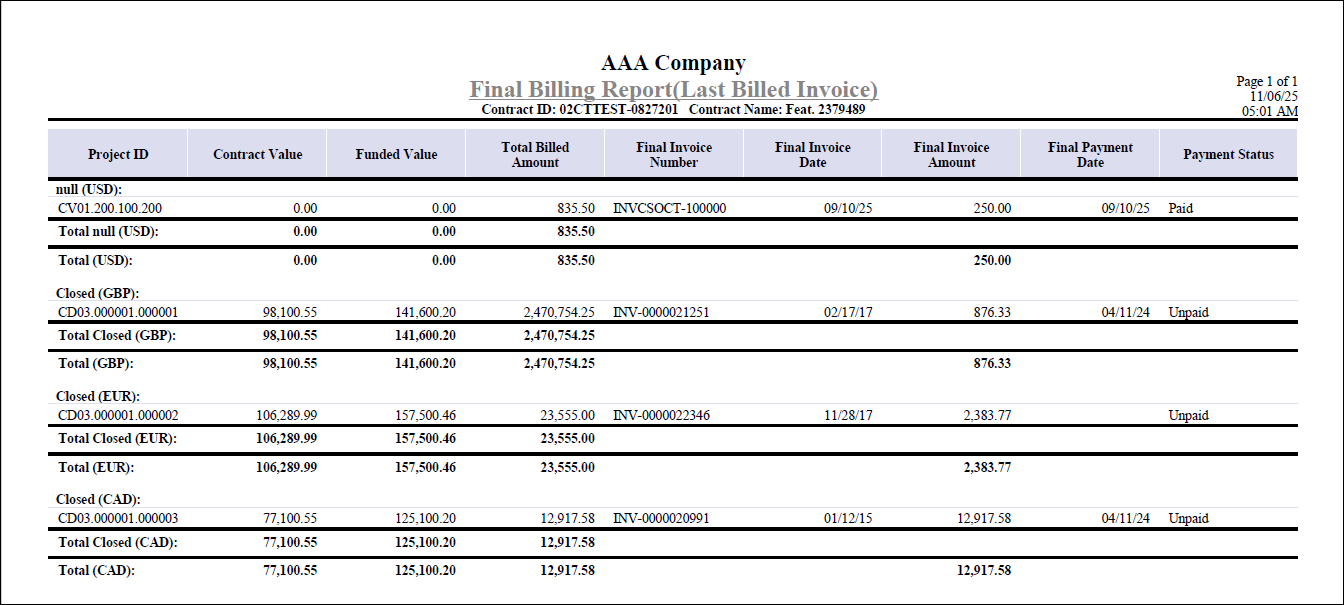
The Final Billing Report presents a comprehensive summary of final billing activity for projects linked to a contract, organized by status and currency.
You can print this report by clicking the Print Report button next to the Final Billing Completed? field on the Contract Closeout tab of Manage Contracts.
The report separates open and closed projects, listing each project's billing details and calculating totals for both categories.
For every project, the report displays:
- Project ID
- Contract Value
- Funded Value
- Total Billed Amount
- Final Invoice Number
- Final Invoice Date
- Final Invoice Amount
- Final Payment Date
- Payment Status
Totals for contract value, funded value, total billed amount, and final invoice amount are calculated and shown for each section and currency, provided that the Multicurrency license is active. Projects are grouped as Open if final billing is not complete, and Closed if final billing is marked as complete.
The report sorts projects by invoice date and highlights payment status as Paid or Unpaid based on the invoice balance. This structure helps you monitor final billing progress and payment status for all projects associated with the contract closeout process.
Here is an example of the Final Billing Report generated from the Manage Contracts screen.