All Purchase Orders Closed Report
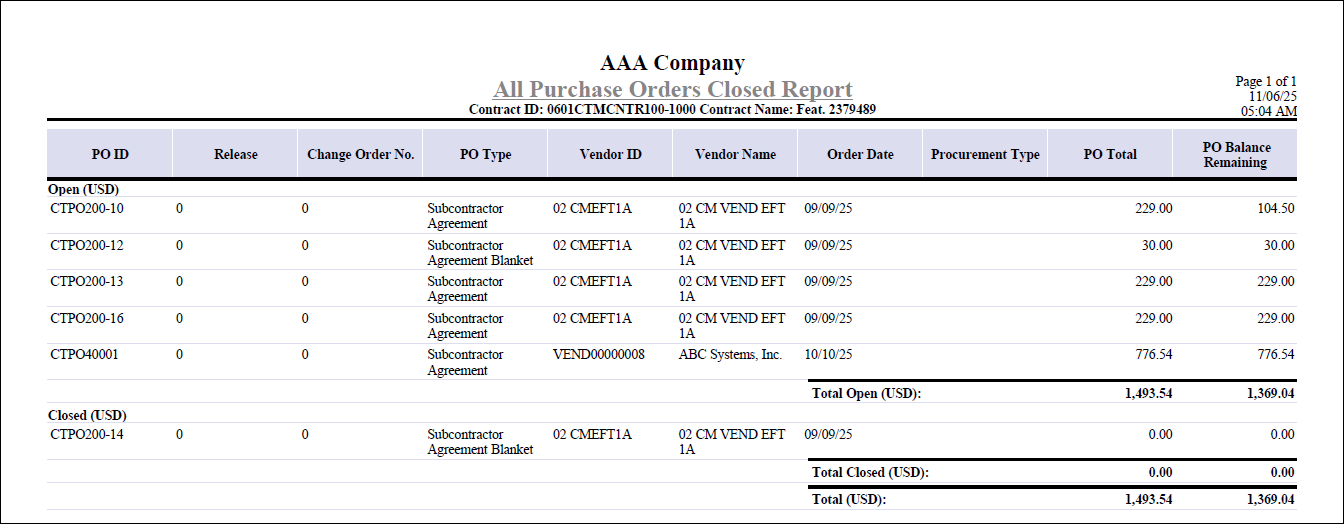
The All Purchase Orders Closed Report provides a comprehensive overview of purchase orders (POs) associated with a contract, helping you quickly distinguish between open and closed POs.
You can print this report by clicking the Print Report button next to the All Purchase Orders Closed? field on the Contract Closeout tab of Manage Contracts.
The report is organized by status, first listing open POs (those with an Open or Pending status), followed by closed POs (those that have been finalized or system-closed). Purchase orders are further sorted by currency within each section, making it easy to review commitments across different currencies.
For each purchase order, the report displays:
- PO ID
- Release and Change Order numbers
- PO Type
- Vendor ID and Vendor Name
- Order Date
- Procurement Type
- PO Total
- PO Balance Remaining
Totals for open and closed POs are calculated and shown for each currency, provided that the Multicurrency license is active. The report includes only purchase orders linked to subcontracts assigned to the contract, ensuring relevance to the closeout process.
Here is an example of the All Purchase Orders Closed Report generated from the Manage Contracts screen.