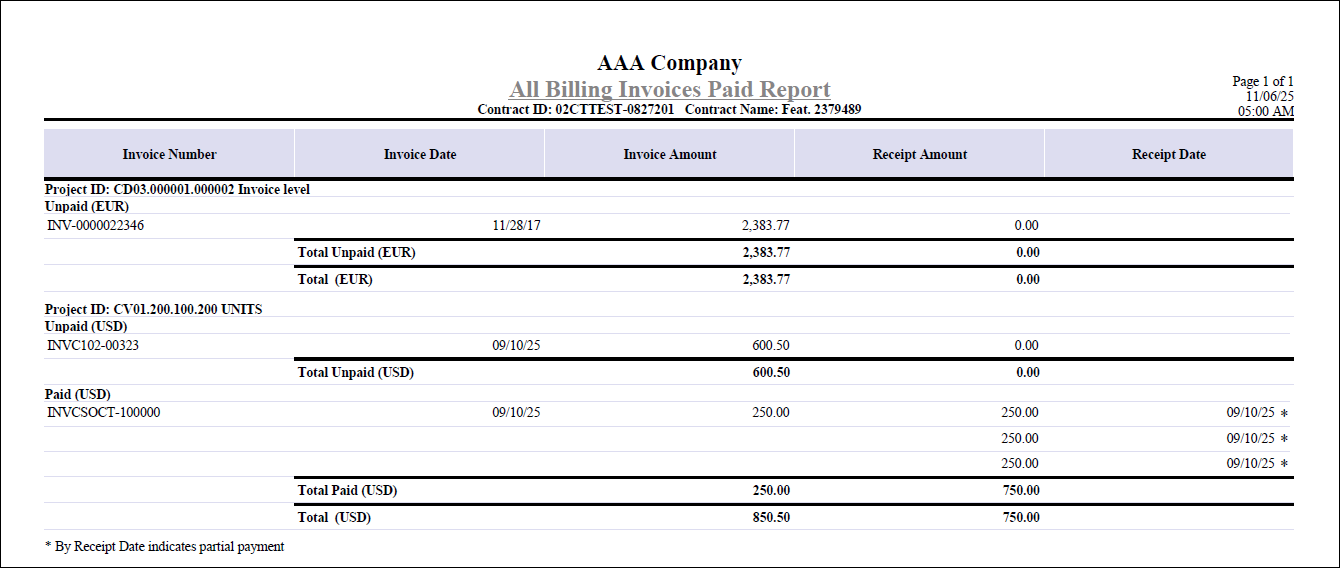
All Billing Invoices Paid Report
The All Billing Invoices Paid Report presents a clear summary of invoice payment status for projects linked to a contract.
You can print this report by clicking the Print Report button next to the All Billing Invoices Paid? field on the Contract Closeout tab of Manage Contracts.
The report is organized by project and currency, making it easy to see which invoices remain unpaid and which have been fully paid.
Invoices are grouped into two sections:
- Unpaid: This lists invoices with outstanding balances. Partial payments are indicated with an asterisk next to the receipt date.
- Paid: This displays invoices that have been fully settled, along with corresponding payment details. In case of overpayment (that is, the total receipt amount is greater than the invoice amount), the invoice will still be listed under the Paid section with an asterisk next to the receipt date.
For each invoice, the report displays:
- Invoice Number
- Invoice Date
- Invoice Amount
- Receipt Amount
- Receipt Date
- Project ID
Totals for unpaid and paid invoices are calculated and shown for each currency, provided that the Multicurrency license is active. The report is generated specifically for projects associated with the contract, ensuring that payment tracking is accurate and relevant to the contract closeout process.
Here is an example of the All Billing Invoices Paid Report generated from the Manage Contracts screen.