Agentic Financial Close Tab
The Agentic Financial Close tab enables you to review results of Dela's assessment of entries and transactions related to the financial close process from a centralized dashboard.
To see data in this tab, you must enable Dela review for each area using the relevant Costpoint application. When you select Recommend as the Dela approval method, possible results are:
- Dela Analyzed Review Advised: The transaction is flagged for manual review due to variations.
- Dela Recommended: The transaction meets the approval criteria and is recommended for approval/selection.
When you select Enforce as the Dela approval method, possible results are:
- Dela Analyzed Manual Approval Required: Manual review and approval are required.
- Dela Approved: The transaction meets the approval criteria and is automatically selected/approved by Dela.
This tab highlights items that Dela identified for further review (i.e.,Dela Analyzed Review Advised and Dela Analyzed Manual Approval Required) and provides an Exceptions report for detailed information.
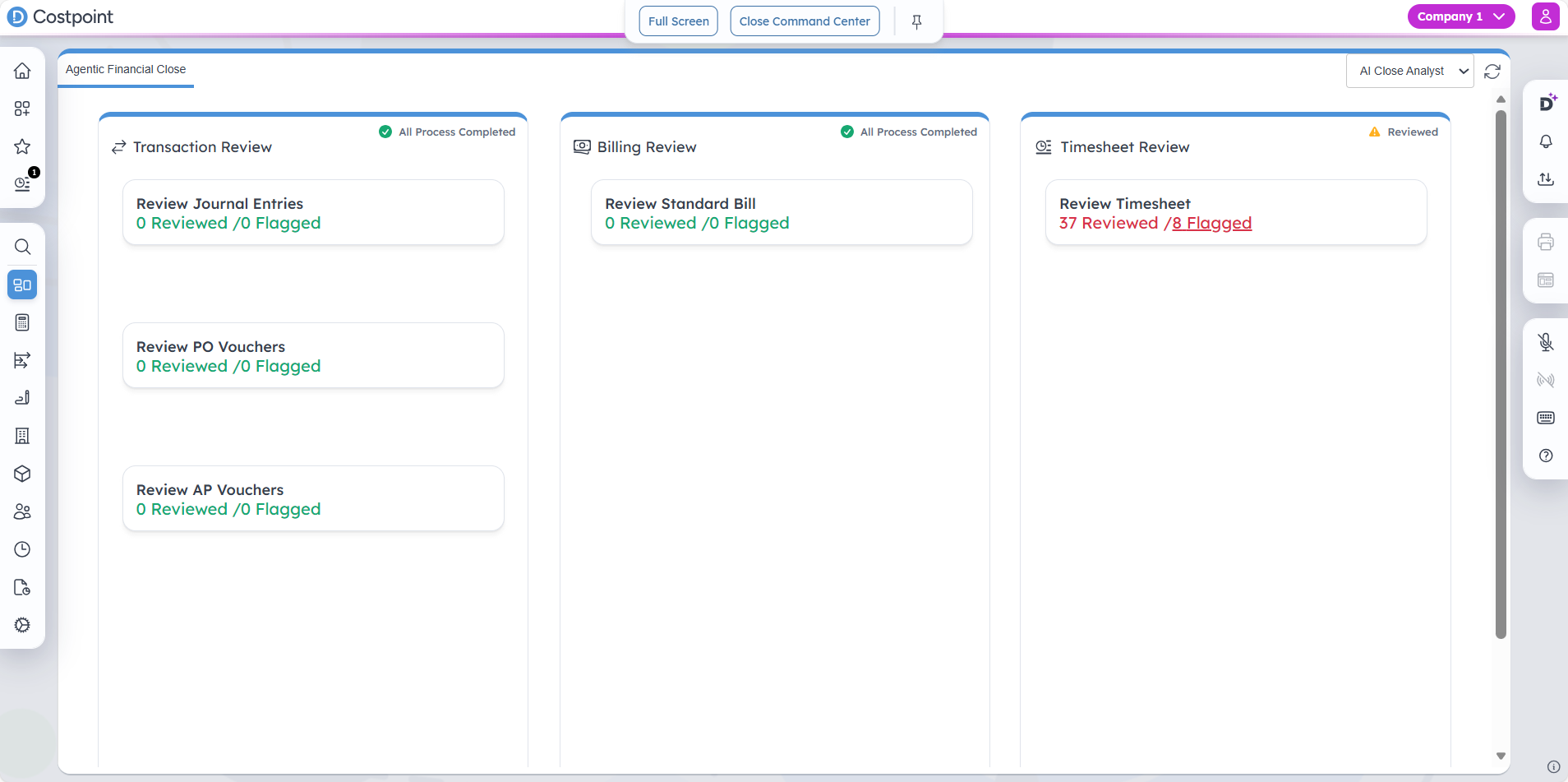
Transaction Review
This section displays transaction-related assessments. When Dela has not flagged anything, All Process Completed displays at the upper-right corner of this section. When flagged items exist, Reviewed is displayed.
| Field | Description |
|---|---|
| Review Journal Entries |
This displays the number of journal entries reviewed and flagged by Dela. Select the flagged count to open the Journal Entries Exceptions report on a new tab. The report provides detailed information about the journal entries identified for manual review. From the report, you can drill through to the Manage Journal Entries screen by clicking the JE Number. |
| Review PO Vouchers |
This displays the number of PO vouchers reviewed and flagged by Dela. Select the flagged count to open the PO Vouchers Exceptions report on a new tab. The report provides detailed information about the PO vouchers identified for manual review. From the report, you can drill through to the Manage Purchase Order Vouchers screen by clicking the Voucher Number. |
| Review AP Vouchers |
This displays the number of AP vouchers reviewed and flagged by Dela. Select the flagged count to open the AP Vouchers Exceptions report on a new tab. The report provides detailed information about the AP vouchers identified for manual review. From the report, you can drill through to the Manage Accounts Payable Vouchers screen by clicking the Voucher Number. |
Billing Review
This section displays billing-related assessments. When Dela has not flagged anything, All Process Completed displays at the upper-right corner of this section. When flagged items exist, Reviewed is displayed.
| Field | Description |
|---|---|
| Review Standard Bills |
This displays the number of standard bills reviewed and flagged by Dela. Select the flagged count to open the Standard Bills Exceptions report on a new tab. The report provides detailed information about the standard bills identified for manual review. From the report, you can drill through to the Manage Standard Bills screen by clicking the Invoice ID. |
Timesheet Review
This section displays timesheet-related assessments. When Dela has not flagged anything, All Process Completed displays at the upper-right corner of this section. When flagged items exist, Reviewed is displayed.
| Field | Description |
|---|---|
| Review Timesheet |
This displays the number of timesheets reviewed and flagged by Dela. Select the flagged count to open the Timesheet Exceptions report on a new tab. The report provides detailed information about the timesheets identified for manual review. From the report, you can drill through to the Manage/Approve Timesheets screen by clicking the T/S End Date. |