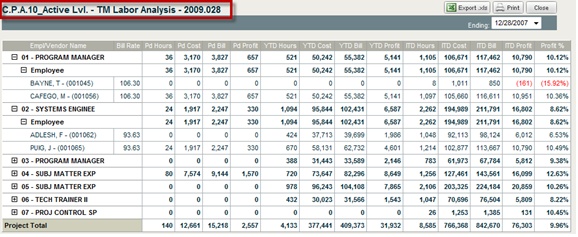
The TM Labor Analysis report shows potential billable revenue based on hours charged to the project and billing rates. It also shows job cost at target rates.
The report provides the details of profit by individual. The drop-down menu below the title of the report enables you to choose a specific time frame.
The Employees and Vendors are categorized by the project labor categories. Vendor costs not subject to billing rates and non-labor costs are excluded.
To access the TM Labor Analysis report, complete the following steps:
From the Budgeting & Planning user interface, click Projects, and then click the Cost Analysis module.
Navigate to the lowest level of the project ID in the project navigation fields.
From the Reports & Actions menu, click TM Labor Analysis.
The TM Labor Analysis screen displays.
Click the + icon to see all the data under each category.