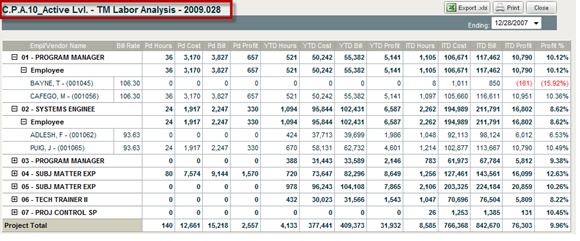
The top portion of the TM Billable Revenue Breakdown report shows potential billable revenue based on billing rates and hours charged to the project. The bottom portion of the report shows the non-labor revenue based on burdened cost plus fee as per your accounting system setup.
Report column headings include Bill Rate, ITD Billable Amount, and billable amounts by the periods of performance.
Vendors can appear in the employee section if billing rates are used for reimbursement.
To access the TM Billable Revenue Breakdown report, complete the following steps:
From the Budgeting & Planning user interface, click Projects, and then click the Cost Analysis module.
Navigate to a T&M project ID in the project navigation fields.
From the Reports & Actions menu, click T&M Billable Revenue Breakdown.
The TM Billable Revenue Breakdown screen displays.