
Nonconformance Dashboard
Use the Nonconformance Dashboard to monitor nonconforming materials, understand trends, identify impacted orders, and analyze average days to disposition.
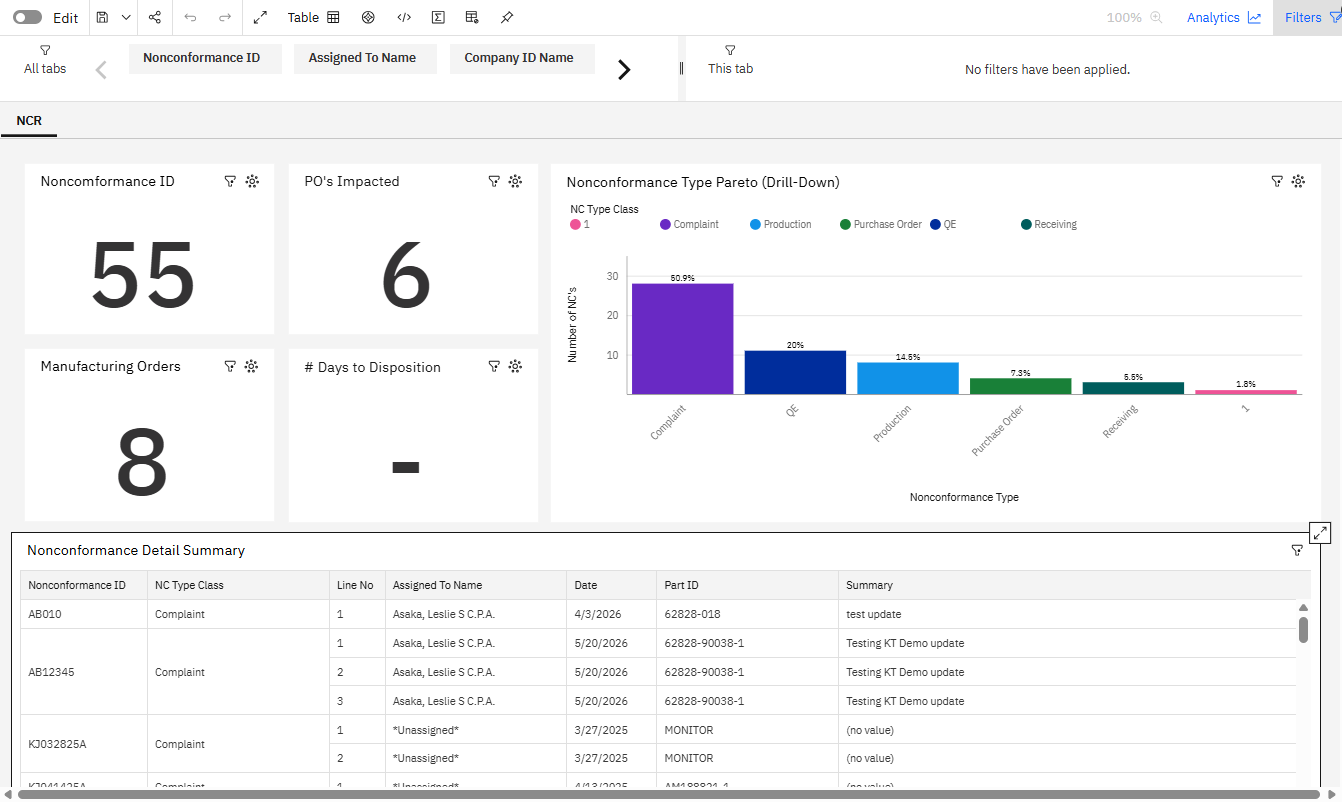
NCR Tab
The NCR Tab provides the following KPIs and chart:
- Nonconformance ID: This KPI value shows the number of active Nonconformance records.
- PO's Impacted: This KPI value shows thhe number of purchase orders that are impacted by Nonconformance records at the Order Reference Header and Impacted Orders subtask.
- Manufacturing Orders: This KPI value shows the number of manufacturing orders impacted by Nonconformance records at the Order Reference Header and Impacted Orders subtask.
# Days to Disposition: This value shows the average number of days it takes to go from Nonconformance Date to Nonconformance Close Date.
Nonconformance Type Pareto (Drill-Down): This bar chart shows the percentage of Nonconformances by Nonconformance type.
Right-click the bar and drill down to see who is assigned to the Nonconformance type.
Right-click the Assigned To bar and drill down to show the Part ID of the Nonconformance Type.
Nonconformance Detail Summary
The Nonconformance Detail Summary lists the active Nonconformance records with additional details, including the ID, type class, assigned to name, date, part ID, and summary.