My Tasks Dashpart
The My Tasks dashpart is a table listing your pending tasks related to timesheets, expense reports, expense authorizations, and resource work schedules. The data on this dashpart comes from Time & Expense.
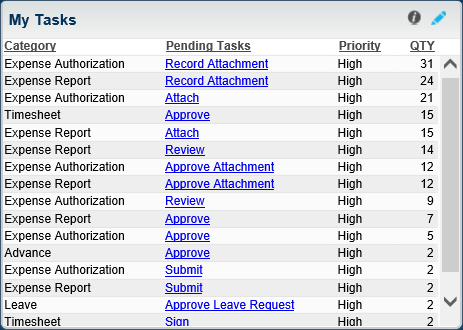
The table displays the category or type of record that requires action (for example, Expense Report, Expense Authorization, Timesheet, Quick Expense, Quick Authorization, Advance, or Leave) and the type of the pending task (for example, Submit, Approve, Sign, Update, or Correct Timeclock). It also displays the number of tasks currently pending for the category as well as the priority level for the task (High, Medium, or Low).
Lines are sorted by Priority level, with High-priority tasks displaying at the top.
Tasks that display are only those with existing records. If QTY for a specific category is 0, the category does not display in the table.
Drill-Through
In the Pending Tasks column, click a task type link to open the specific screen in Time & Expense where you need to accomplish the outstanding task or view additional details related to the task. This dashpart is linked to the following applications:
- Expense Authorization
- Expense Report
- Manage/Approve Expense Authorizations
- Manage/Approve Expense Reports
- Manage/Approve Timesheets
- Quick Entry Expense Authorization
- Quick Entry Expense Report
- Resource Work Schedules
- Timesheet or Time Clock
- Timesheet Correction Status
