
Cookies
The web client uses various cookies to store necessary and functional data. These cookies improve performance and usability.
The three ways by which the web client stores these cookies in a user's browser are:
- Local Storage - The web client retains persistent data even after the browser is closed, until the user explicitly deletes it.
- Session Storage - The web client stores data for the duration of a page session.
- Cookies - The web client stores small pieces of data for tracking authentication and user sessions.
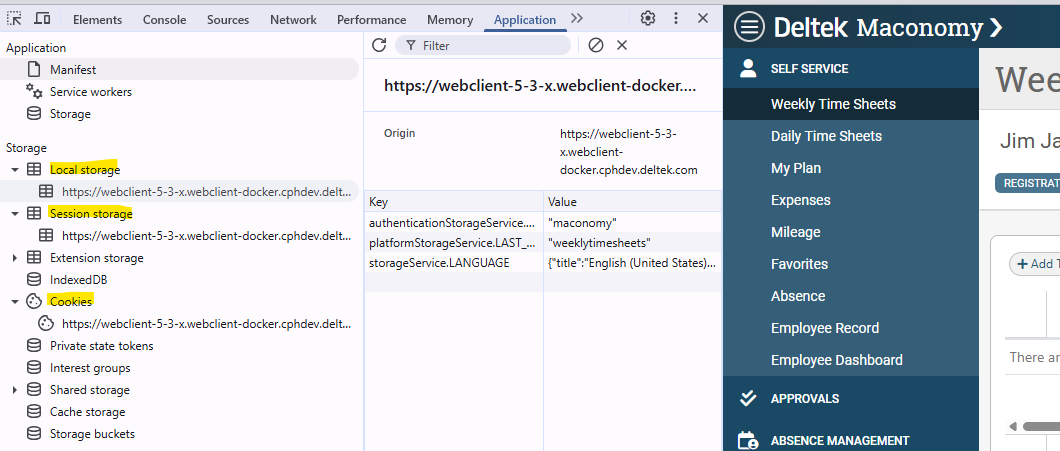
Cookies should not be disabled in the browser, as this can have a detrimental effect on the user experience.
Current Cookies
The following table provides a list of cookies, a brief description of their use, their storage location, and their category within the web client.
| Cookie | Description | Storage Location | Category |
|---|---|---|---|
| Maconomy-xxxx | Used to determine if a web client session is still active. | Cookie | Required |
| TOKEN | Critical for user authentication and session management. | Session | Required |
| COMPONENT_URL | Used within authentication.guard as part of the login experience. | Session | Required |
| USERNAME | Enhances the login experience. | Session | Required |
| BO_TOKEN | Enhances the login experience. | Session | Required |
| PP_TOKEN | Enhances the login experience. | Session | Required |
| REALM | Enhances the login experience. | Session | Required |
| OAUTH_LOGIN_MODE | Enhances the login experience. | Session | Required |
| OAUTH_PROVIDER | Enhances the login experience. | Session | Required |
| URL_WHEN_SESSION_EXPIRED | Enhances the login experience. | Session | Required |
| MACONOMY_FORMAT | Pre-fills selected localization format. | Session | Required |
| LOGIN_MODE | Enhances the login experience. | Local | Required |
| LANGUAGE | Improves UI by remembering the user's language choice. | Local | Required |
| LAST_USED_WORKSPACE | Improves user workflow by remembering the last workspace. | Local | Required |
| COLOR_SCHEME | Enhances appearance. | Local | Required |
| RETURN_TO_TOOLS | Used to return to tools area after logging in. | Local | Required |
| RETURN_TO_CONTAINER_EXPLORER | Used to return to tools area after logging in. | Local | Required |
| RETURN_TO_DIALOG_GROUP_IMPORTS | Used to return to tools area after logging in. | Local | Required |
| USERNAME | Pre-fills username during the session. | Local | Required |
| COOKIE_CONSENT | See section below on Cookie Consent. | Local | Required |
| Gainsight | See section below on Usage Tracking. | No cookie is stored. | Analytical |
Cookie Consent
Background
Deltek's goal is to develop a standardized approach to Cookie Consent Management across the Deltek Product Portfolio, ensuring that all products comply with relevant cookie regulations in the geographies where they are used. An opt-in approach has been implemented within the web client. The main points are as follows:
- Maconomy will not load or store cookies on the user's device until they have provided consent.
- Users will be informed that cookies are being used on the site.
- A clear list of the cookies that are used, categorized by type (for example: Required, Functional, Analytical), will be provided to users.
- Users will be asked to consent, with the option to accept all cookies or choose specific categories to opt into.
Configuration
By default, the Cookie Consent feature is enabled. If customers choose to disable the feature, Maconomy will continue to store all cookies, with users having no option to control what type of cookies are stored.
To disable the feature, update the Usagetracking.json as follows:
|
Login
If cookie consent is enabled and a user is launching the application for the first time after upgrading, Maconomy will display the Cookie Consent modal before the login modal. (This assumes that the COOKIE_CONSENT cookie is not present in local storage.)
The user will be presented with the following dialog box. They can close this modal by clicking Accept Only Required Cookies or Accept All Cookies.
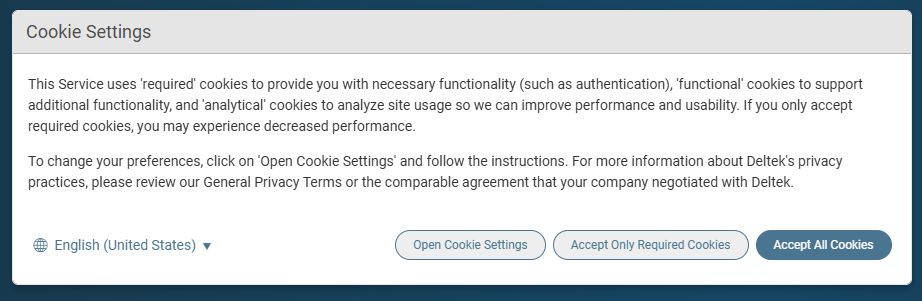
They can also access a more detailed settings dialog box which will allow them to be more selective about what is stored.
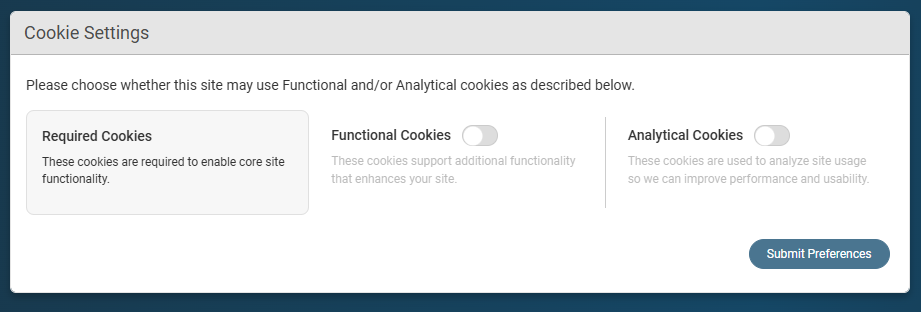
These dialog boxes cannot be cancelled. Once the user confirms their selection, Maconomy will close the dialog box and display the login dialog box. The process is the same for all authentication methods.
Note: If the COOKIE_CONSENT cookie is deleted at any time, the user will be presented with the Cookie Settings dialog boxes again the next time they log in to the application.
Settings Dialog
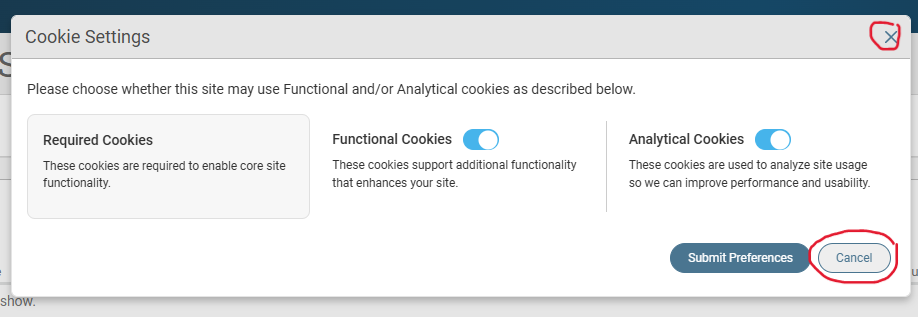
Once logged in, the user can modify these settings at any time. To do this, they can click the avatar icon on the top right corner of their screen, then select Cookie Settings from the dropdown.
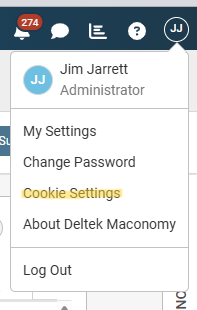
When accessed from this dropdown, the Cookie Settings dialog box can be cancelled or closed.
Usage Tracking
The web client uses Gainsight Product Experience (PX). Gainsight is a third-party analytics platform that tracks user activities such as pageviews, feature usage, and navigation paths; it provides insight into user experience and product performance.
Usage tracking is enabled by default through the Enable Usage Tracking system parameter. However, end users can turn off the collection of data via the Cookie Settings dialog box: by clicking Accept Only Required Cookies, or by turning off the Analytical Cookies toggle specifically. However, if cookie consent has been disabled entirely, end users will not be able to opt out of being tracked.
Note: Although controlled by Cookie Settings, Gainsight does not store an associated cookie within the browser.