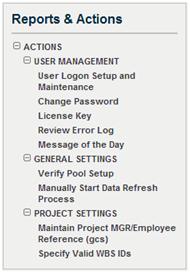
After the installation of GCS Premier© Budgeting & Planning, the Super Administrator (also called Super Admin) must execute the post-install configuration settings to set up database tables that control the behavior of GCS Premier Budgeting & Planning. These configuration settings must be done before setting up and registering users.
Everyone who uses GCS Premier Budgeting & Planning has established roles. Because the role of each user is unique and is tied to the projects and/or organizations for which that user has management responsibilities, GCS Premier Budgeting & Planning requires a named seat license for each person.
The super administrator has a separate, distinct login that does not use a seat license. The functionalities listed in the Reports & Actions menu enable you to register each GCS Premier Budgeting & Planning user. You can also create general messages to all users and assist users when an error page is encountered.
The Manually Start Database Refresh Process, also under General Settings, has an impact on the contents of the database and is, therefore, included in this category of Administrator functions. You must execute a Manual Refresh Process before each month is closed and before each fiscal year is closed.
Under Project Settings, accounting system-specified alternative project structures can be referenced so that they can be reflected in the GCS Premier Budgeting & Planning project navigation structure.
If you have an alternative project structure established in your accounting system, GCS Premier Budgeting & Planning allows this structure to be mapped into its project navigation structure. In GCS Premier, you can have multiple alternate project structures established for reporting purposes. If more than one structure includes the same lowest level project task ID, then only one structure should be selected for mapping into GCS Premier Budgeting & Planning. The Specify Valid WBS IDs functionality is used for this purpose.