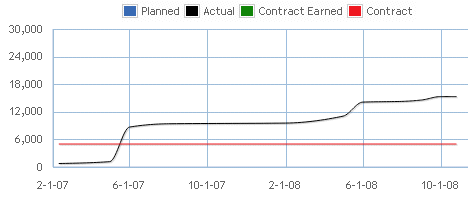
The Labor Plan Timeline chart on the Planning tab displays the cumulative planned and actual labor charges, as well as the amount of contract earned through today. It also displays the estimate-at-completion amount for tomorrow forward and the contract amount over the life of the project, phase, or task.
Contents
The periods displayed on the chart reflect the entire project, from the earliest date to the end date. For phases and tasks, the chart displays the dates and amounts applicable at the phase or task level.
As you select a project, phase, or task on the Planning grid, the amounts on the chart update to reflect the data shown on the grid. The chart also updates to include edits to the plan when the edits are saved. To view additional details, mouse over or tap the chart’s data points.
Note: If a project is mapped on multiple Vision plans and the
Include in utilization and project reports
option is selected, the
Planned and
EAC lines are a combined total. The
Contract Earned line may also be a combined total if the percent complete formula is one of the following: (Planned – Estimate-to-Complete)/Planned or (Baseline – Estimate-to-Complete)/Baseline. Actual and contract lines are not combined.
| Field | Description |
|---|
| Planned
|
This field displays the planned labor at billing amount, through today's date, for the project, phase, or task row that is selected on the Planning grid.
Calculation: Planned = Planned labor amount at billing through today
|
| Actual
|
This field displays the billing value of posted and unposted labor charges through today's date for the project, phase, or task row that is selected on the Planning grid.
Calculation: Actual = Billing value for posted and unposted labor charges at billing through today
The dotted line that starts after the vertical today's date line represents the EAC amount beyond today for the project, phase, or task row that is selected on the Planning grid.
Calculation: EAC = JTD labor amount at billing through today + ETC labor amount at billing from tomorrow forward for plans in utilization.
|
| Contract Earned
|
This field displays the contract earned amount, based on the Percent Complete Formula selected in the plan. The options that impact this amount are as follows:
- (Planned - Estimate-to-Complete)/Planned
- Job-to-Date/(Job-to-Date + Estimate-to-Complete)
- (Baseline - Estimate-to-Complete)/Baseline
Calculation: The percent complete is calculated for each period. This percent is then multiplied by the contract at the project level to determine the amount of the contract that has been earned for the period.
If a project is mapped to multiple Vision plans that have the
Include in utilization and project reports
option selected, but there are different percent complete formulas assigned to the plans, Navigator applies the percent complete formula from the plan with the earliest creation date.
The
Contract Earned line does not display in the following situations:
- If the Percent Complete Formula on the Vision plan is set to User Entered.
- If the Percent Complete Formula is set to (Baseline - Estimate to Complete)/Baseline but there is no baseline
- If there is no planned data
- If there is no JTD + ETC data
|
| Contract
|
This field displays the compensation amount, based on the amount in the
Compensation field in the Vision Project Info Center for the selected project, phase, or task.
Calculation: Contract = Compensation from Project Info Center
If no contract amount displays, verify that an amount is assigned in the Vision Project Info Center for the project, phase, or task.
If your firm uses Vision Multicurrency, the currency amounts display in the project's billing currency or project currency. The currency is based on the
Use Billing Currency not Project Currency option in Vision Accounting System Settings.
|
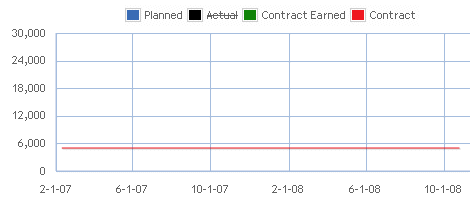
Note: You can turn on and off all the chart lines except the dotted EAC line on the Labor Plan Timeline chart. Click the line name in the chart legend to turn off or on the charts.