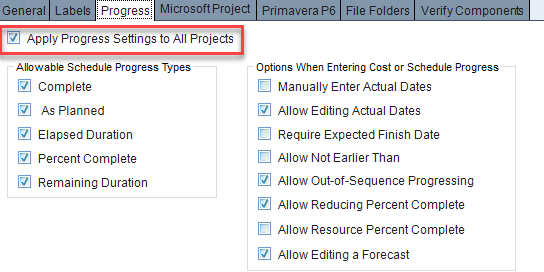
The validations for the import cost progress are identical to those on the Enter Cost Progress form, including the system-level options on the Progress tab of the System Settings form.
Many of these validations are based on progress options, which can be set either on the Progress tab of the System Settings form or on the Progress tab of the Projects form. When progress settings are applied to all projects, the options in the Projects form view are disabled.
The settings on the Progress tab of the System Settings form allow you to configure settings for all projects (system-level), whereas the fields on the Progress tab of the Projects form allow you to configure settings on a project-by-project basis (project-level).
An error message indicates that the data is ignored, and no new progress entry is created. The record is included in the Import Summary report.
This table lists the Import Cost Progress error messages displayed in the status log, along with the actions required for the user.
Error Message |
Action |
The specified project does not exist in Cobra. Sample Message: Project "Ship" does not exist in Cobra. |
Ensure that the project provided exists in Cobra. |
The specified project is not visible in PM Compass. Sample Message: Project "Ship" is not visible in PM Compass. |
Ensure that the project provided is visible in PM Compass. |
The specified project is a master project. Sample Message: Project "SHIPMASTER" is a master project. Specify the subproject name. |
Provide a subproject. |
The work package does not exist in the specified project. Sample Message: "Project/CA1/CA2/CA3/WP" does not exist. |
Ensure that the work package provided exists in the project. |
The work package uses the earned value technique of Planning Package (K). Sample Message: The EVT is planning package. You must change the EVT before submitting progress. |
Provide a different earned value technique for the work package. |
The Actual Start is invalid. It must be prior to or equal to the Period End Date. Sample Message: The Actual Start "7/5/2024" is invalid. It must be before or equal to the Period End Date "5/31/2024". |
Ensure that the Actual Start provided is earlier than or equal to the Period End Date. |
The Actual Start is invalid. It must be earlier than the Actual Finish. Sample Message: The Actual Start of "6/29/2024" is invalid. It must be before the Actual Finish of "6/15/2024". |
Ensure that the Actual Start provided is earlier than the Actual Finish. |
The Allow Editing Actual Dates option is not selected. The Actual Start Date is ignored. Sample Message: The Actual Start of "12/30/2023" is invalid. The option Allow Editing Actual Dates is not checked, and the Actual Start is "10/30/2023". |
Provide the same Actual Start that is in the live project or select the Allow Editing Actual Dates option to replace the Actual Start with the imported value. |
The Allow Editing Actual Dates option is not selected. The Actual Start being imported is blank and the live project has an Actual Start. Sample Message: The blank Actual Start is invalid. The option Allow Editing Actual Dates is not checked, and the Actual Start is ”05/31/24”. |
When the Actual Start is not provided and one already exists in the live project, the import assumes you are trying to remove the data. Provide the Actual Start or select the Allow Editing Actual Dates option. |
The Actual Finish is invalid. It must be prior to or equal to the Period End Date. Sample Message: The Actual Finish "6/22/2024" is invalid. It must be before or equal to the Period End Date "5/31/2024". |
Ensure that the Actual Finish provided is earlier than or equal to the Period End Date. |
The Actual Finish is invalid. It must be later than the Actual Start. Sample Message: The Actual Finish "2/1/2024" is invalid. It must be after the Actual Start "5/27/2024". |
Ensure that the Actual Finish provided is later than the Actual Start. |
The Actual Finish is required when the Manually Enter Actual Dates option is selected, and all milestones are Complete. Sample Message: Actual Finish is required when the option Manually Enter Actual Dates is checked, and all milestones are Complete. |
Provide the Actual Finish when all milestones are complete and the Manually Enter Actual Dates option is selected. |
The Actual Finish is required when the Manually Enter Actual Dates option is selected, and all resource progress is Complete. Sample Message: Actual Finish is required when the option Manually Enter Actual Dates is checked, and all resource progress are Complete. |
Provide the Actual Finish when all resources are complete and the Manually Enter Actual Dates option is selected. |
The Actual Finish being imported is not equal to the Actual Finish in the live project, and the Allow Editing Actual Dates option is not selected. The Actual Finish is ignored. Sample Message: The Actual Finish "6/29/2024" is invalid. The option Allow Editing Actual Dates is not checked, and the Actual Finish is "5/31/2024". |
Select the Allow Editing Actual Dates option to replace the Actual Finish with the imported value. |
The Forecast Start must be earlier than the Forecast Finish. Sample Message: The Forecast Start "9/3/2024" cannot be later than the Forecast Finish "8/14/2024". |
Ensure that the Forecast Start provided is earlier than the Forecast Finish. |
The Forecast Finish is invalid. It must be equal to or later than the Forecast Start. Sample Message: The Forecast Finish "6/2/2024" is invalid. It must be equal to or after the Forecast Start "6/10/2024". |
Ensure that the Forecast Finish provided is later than or equal to the Forecast Start. |
The Allow Reducing Percent Complete option is not selected. The Percent Complete field value is ignored. Sample Message: The option Allow Reducing Percent Complete is not checked, and the Percent Complete of "40" is ignored because it is less than the existing value of "50". |
Select the Allow Reducing Percent Complete option to replace the Percent Complete field with the imported value. |
The Manually Enter Actual Dates option is selected, and the Actual Start is blank. The Percent Complete value is ignored. Sample Message: The Percent Complete of "10" is invalid. The option Manually Enter Actual Dates is checked, and the Actual Start is blank. |
Provide the Actual Start to replace the Percent Complete field with the imported value. |
The Forecast Start is invalid. It must be later than the Period End Date. Sample Message: The Forecast Start "5/27/2023" is invalid. It must be later than the Period End Date "6/29/2024". |
Ensure that the Forecast Start provided is later than the Period End Date. |
The Forecast Finish is invalid. It must be later than the Period End Date. Sample Message: The Forecast Finish "7/14/2023" is invalid. It must be later than the Period End Date "6/29/2024". |
Ensure that the Forecast Finish provided is later than the Period End Date. |
The Actual Start is invalid because the Percent Complete value is less than 0. Sample Message: The Actual Start of "01/01/24" is invalid because Percent Complete was not provided. |
Ensure that the Percent Complete value provided is greater than 0 when the Actual Start is provided. |
The resource is invalid, the work package is Planned, and the Manually Enter Actual Dates option is selected. Sample Message: Resource 23/ Budget % complete is invalid. Work Package 1.2.A.102/1.MFG.FRM1/1.2.A.102.02 is Planned and Manually Enter Actual Dates is checked. |
This error occurs when the work package provided is Planned and the Resource % Complete is being updated to a value greater than 0, and the Manually Enter Actual Dates option is selected. |
Reducing resource is invalid when the work package is Completed, the Resource % Complete is less than 100 and Allow Reducing Percent Complete is not selected. Sample Message: Reducing resource 41/ Budget % complete is invalid. Work Package 1.2.A.103/1.MFG.FRM2/1.2.A.103.09 is Completed and Allow Reducing Percent Complete is unchecked. |
This error occurs when the work package provided is Completed, the Allow Reducing Percent Complete option is not selected, and the imported Resource % Complete value is less than the live project value. |
Resource does not exist in the project. Sample Message: Resource ID Eng/Budget does not exist on entry "Ship/1.2.A.103/1.MFG.FRM2/1.2.A.103.09". |
Ensure that the resource provided exists in the Cobra live project. |
Milestone Forecast Finish must be later than the Period End Date. Sample Message: Milestone "01" Forecast Finish "5/12/2024" should be later than the Period End Date "5/31/2024". |
Ensure that the Milestone Forecast Finish provided is later than the Period End Date. |
Milestone does not exist in the work package. Sample Message: Milestone "01" does not exist on entry "Ship/1.1.1/1.ENG.CLARK/1.1.1.1". |
Ensure that the milestone provided exists in the selected work package. |
Milestone Actual Finish should be earlier than the Period End Date. Sample Message: Milestone "001" Actual Finish "6/30/2024" should be earlier than the Period End Date "6/29/2024". |
Ensure that the Milestone Actual Finish provided is earlier than the Period End Date. |
The milestone Percent Complete value is invalid. Sample Message: Work Package is invalid. The Milestone Percent Complete of "-10" on milestone MS1 is invalid. It must be between 0 and 100. |
Ensure that the Percent Complete value provided is between 0 and 100. |
The resource Percent Complete value is invalid. Sample Message: Work Package is invalid. The Resource Percent Complete of "-10" on resource SHIP.LABOR.01 is invalid. It must be between 0 and 100. |
Ensure that the Percent Complete value provided is between 0 and 100. |
The Percent Complete value is invalid. Sample Message: The Percent Complete of "-10" is invalid. It must be between 0 and 100. |
Ensure that the Percent Complete value provided is between 0 and 100. |
A warning message indicates that the invalid data is ignored, but the remaining valid data is applied to create a new progress entry.
This table lists the Import Cost Progress warning messages displayed in the status log, along with the actions required for the user.
Warning Message |
Action |
Skipping Percent Complete check. Work Package EVT is Milestones. |
Ensure that the fields provided in the JSON files are also available in the PM Compass application. |
Skipping Units Complete check. Work Package EVT is Milestones. |
Ensure that the fields provided in the JSON files are also available in the PM Compass application. |
Duplicate records Sample Message: A duplicate Work Package 1.1.4/1.1.4.101 has been found. Changes made to the processed records have been overwritten. |
Ensure that there are no duplicate records in the JSON files. |
The project in the JSON file does not match the source system to update in PM Compass. Sample Message: There are existing records from another source system. Skipping processing them. |
Ensure that the project provided in the JSON files matches the Source System to Update field on the Progress tab of the Projects form. |