Enable SQL Logging and SQL Exceptions
You can enable SQL logging and SQL exceptions in PM Compass to always
log SQL errors even when normal SQL logging is turned off. This allows
you to track the elapsed time for queries to help you to determine whether
a process is slow or never-ending and will log any errors encountered.
Make sure that all users are logged out of PM Compass before making
these changes. When changes are made, all users will automatically be
logged out.
To enable SQL logging and SQL exceptions in PM
Compass:
Locate the PM Compass installation
folder and open web.config.
Add the following keys under
the <appSettings> section:
<add
key="SQLLogging" value="<Y/N>"/>
<add
key="SQLLogDirectory" value="<log path>"
/>
The SQL log directory that you enter here must already exist.
Deltek recommends creating a new logs folder called SqlLogs on the
same level as the folder where you store your Integration Process
logs. For example, if this is your Integration Files folder: \\<servername>\<Deltek
folder>\ProcessLogs, then you create your SqlLogs folder here:
\\<servername>\<Deltek folder>\SqlLogs.
To see the location of your Integration Process logs, log into PM
Compass and click Administration » System Settings » Files
Folders tab.
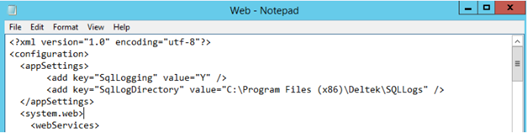
SQLLogging
— This defines whether or not SQL logging is enabled. The value
is Y (TRUE) or N
(FALSE). If the setting is not defined in web.config, the default
value is N.
SQLLogDirectory
— This is the path where the logs are stored. If there is no value,
the system does not save any SQL logs. In the screenshot above,
"C:\Program Files (x86)\Deltek\SQLLogs" />"
is an example.
On the Start menu, click
Run.
Enter inetmgr
and click OK. This opens IIS.
Locate and restart the PM
Compass web application. By default, this is located under Default
Web Site.
How PM Compass Writes SQL Logs and SQL Exceptions
The table below shows the conditions under which PM Compass writes logs
for SQL and SQL exceptions.
SQLLogging |
SQLLogDirectory
Value |
Will
Write SQL Logs? |
Will
Write SQL Exceptions? |
Y |
Not specified
or folder does not exist |
No |
No |
N |
Valid path entered |
No |
Yes |
Y |
Valid path entered |
Yes |
Yes |
N |
Not specified
or folder does not exist |
No |
No |
Log Format for Query Without Exception (One Line Per SQL Execution)
[Time Started] [SQL Query] [Elapsed Time] [Number of records returned/Affected
records]
Sample log content:
2019-11-21T17:05:04.888 SELECT CostSystem FROM CAM_SystemSettings 0.001
1
Log Format for Queries with Exception (One Line per SQL Execution)
[Time
Started] [SQL Query] [Elapsed Time] ERR:[Exception Error] [Call
Stack]
Sample log content:
2018-11-21T17:05:04.888 SELECT
CostSystem FROM CAM_SystemSettings ERR: ORA-00001: unique constraint (PMC81COB82CU5ORAUPG.CAM_ITEMUPDATESTATUSPK)
violated at Oracle.DataAccess.Client.OracleException.HandleErrorHelper(Int32
errCode, OracleConnection conn, IntPtr opsErrCtx, OpoSqlValCtx* pOpoSqlValCtx,
Object src, String procedure, Boolean bCheck) at Oracle.DataAccess.Client.OracleException.HandleError(Int32
errCode, OracleConnection conn, String procedure, IntPtr opsErrCtx, OpoSqlValCtx*
pOpoSqlValCtx, Object src, Boolean bCheck) at Oracle.DataAccess.Client.OracleCommand.ExecuteNonQuery() at
Deltek.Framework.Ancestors.Server.ParameterizedCommand.ExecuteCommand(Object[]
parameterValues) in C:\Development\FrameworkDotNet\production\46PMC81\VB\Server\Ancestors\ParameterizedCommand.vb:line
155