Use the Project Progress dashpart to view the overall percent complete for the project's assigned labor, expenses, and consultants, which allows you to quickly assess where you stand on the project through the current date.
Contents
This dashpart breaks down the JTD and ETC for labor, expenses, and consultants; the amounts for each are pulled directly from the grids on the Labor, Expenses, and Consultants pages, providing you with a quick overview of the project's overall progress.
The amounts on this dashpart display at billing or cost, depending on the budget type (Billing, Cost, or Cost and Billing) that is selected in Navigator's Plan Settings. After you specify the budget type, there are
Billing and/or Cost options that display on the Planning page to indicate the type of amount that you are viewing. The dashpart's criteria, amounts, title, and heading color also reflect the selection. If both
Billing and Cost options display, you can switch between them and the dashpart's information will update accordingly.
If your firm uses Vision Multicurrency, the currency in use is indicated next to the
Billing
and
Cost options. For example,
Billing (USD)
displays if you are viewing the plan at billing and in U.S. dollars. The Project Currency is always used when viewing projects and plans at cost. The currency used when viewing projects and plans at billing is determined by a Vision Configuration setting that your system administrator selects. See the Use Project and Billing Currencies online help topic for more information on currencies.
Note: The Accounting tab in
determines your access rights to labor costs rates and amounts in Navigator. When you select the Cost option, some information may not display because of your security access. See the Security Settings and Labor Cost Amounts online help topic for more information.
| Field | Description |
|---|
| Project Progress Bars
|
The JTD and ETC (Navigator) bars display what percent of the total planned bill amount is complete through today, and what percent of the planned bill amount remains for the total labor, expenses, and consultants.
You can view a summary of the percentages for each part of the project. For example, on the following project, Consultants are 55% complete, while Expenses are 98%.
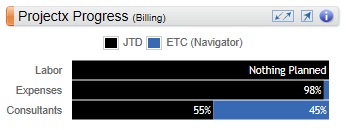
You can also hover over each progress bar to view a summary of the amounts that are used the calculate the percentages. For example, when you hover over Consultants, the respective JTD, ETC, and EAC amounts display.
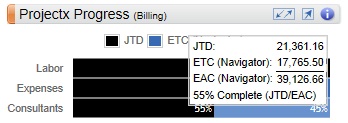
To complete this calculation, the EAC is pulled directly from the Labor page. And, the EAC for Expenses and Consultants is derived by summing the JTD and ETC amounts for each as shown on their respective pages.
JTD = 21,361.16
ETC (Navigator) = 17,765.50
EAC (Navigator) = 39,126.66
% Complete = 55% (JTD/EAC)
ETC % = 45%
If there is JTD but no planned amount, the bar displays
Nothing planned.
|
|
|
| Tooltips
|
Tooltips display when you hover over or tap various parts of the Navigator interface, including buttons, status and warning indicators, and data on the dashparts and charts. You can also click the
 buttons to view specific calculation information, and click the
More links to access the pertinent Navigator online help. buttons to view specific calculation information, and click the
More links to access the pertinent Navigator online help.
If you are using a tablet device, the tooltip hover action is not available, but you can tap the
buttons and
More links to view the calculations and online help.
|