Project Progress Dashpart

Use the Project Progress dashpart to view the overall percent complete for the project's assigned labor, expenses, and consultants, which allows you to quickly assess where you stand on the project through the current date.

Contents

This dashpart breaks down the JTD and ETC for labor, expenses, and consultants; the amounts for each are pulled directly from the grids on the Labor, Expenses, and Consultants pages, providing you with a quick overview of the project's overall progress.

If your firm uses Vision Multicurrency, the currency amounts display in the project's billing currency or project currency. The currency is based on the Use Billing Currency not Project Currency option in Vision > Accounting > System Settings.

Field Description
Project Progress Bars

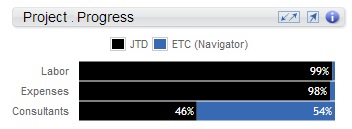
The JTD and ETC (Navigator) bars display what percent of the total planned bill amount is complete through today, and what percent of the planned bill amount remains for the total labor, expenses, and consultants.

  • JTD: This portion of the bar represents the sum of all labor charges on posted and unposted transactions, plus the sum of all expense and consultant-related charges and committed purchase orders through today. The amounts are pulled directly from the JTD column on the associated Labor, Expenses, or Consultants page.

    JTD% = (JTD/EAC (Navigator)) * 100

  • ETC (Navigator): This is the percent of the plan that remains for completion for the labor, expenses, or consultants. For labor, this is from tomorrow forward through the end of the plan, and for expenses and consultants, this is through today. For projects with multiple Vision plans, the planned bill amount is from the plans that are included in utilization. The ETC (Navigator) amounts are derived from the following values that display on each Planning page.
    • Labor ETC = ETC amount on Labor page
    • Expenses ETC = ETC (Navigator) on Expenses page
    • Consultants ETC = ETC (Navigator) on Consultants page

    ETC (Navigator) % = (ETC (Navigator)/(ETC (Navigator) + JTD)) * 100

You can view a summary of the percentages for each part of the project. For example, on the following project, Consultants are 46% complete, while Expenses are 54%.

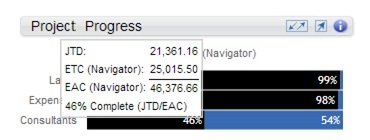
You can also hover over each progress bar to view a summary of the amounts that are used the calculate the percentages. For example, when you hover over Consultants, the respective JTD, ETC, and EAC amounts display.

To complete this calculation, the EAC is pulled directly from the Labor page. And, the EAC for Expenses and Consultants is derived by summing the JTD and ETC amounts for each as shown on their respective pages.

JTD = 21,361.16

ETC (Navigator) = 25,015.50

EAC (Navigator) = 46,376.66

% Complete = 46% (JTD/EAC)

ETC % = 54%

If there is JTD but no planned amount, the bar displays Nothing planned.